Table of contents Toc Icon
Table of contents Toc Icon
Some aspects of accounting are universal to all businesses, such as recording transactions, collecting revenue, and paying bills. But accounting for a manufacturing business involves some unique ones.
The manufacturing industry needs to account for raw materials, work in process, and finished goods. The industry needs to decide how to account for manufacturing costs and value inventory and pay attention to which product lines are most profitable.
QuickBooks Enterprise for Manufacturing & Wholesale has everything a manufacturing business needs to account for costs and inventory and analyze business performance. Here’s a look at the top eight features of QuickBooks Enterprise that every manufacturing business needs.
Don’t overpay or miss out on features. Find the best QuickBooks Enterprise version tailored to your needs.
1. Manufacturing and Wholesale Chart of Accounts
The chart of accounts for a manufacturing business is very different from that of a retailer or service-based business. The developers behind QuickBooks Enterprise for Manufacturing & Wholesale know this.
That’s why QuickBooks Enterprise has industry-specific charts of accounts. When you create a new company file in QuickBooks Enterprise, you can choose a predefined industry close to what your company does. Then the software will generate a default chart of accounts that includes many of the accounts your business needs.
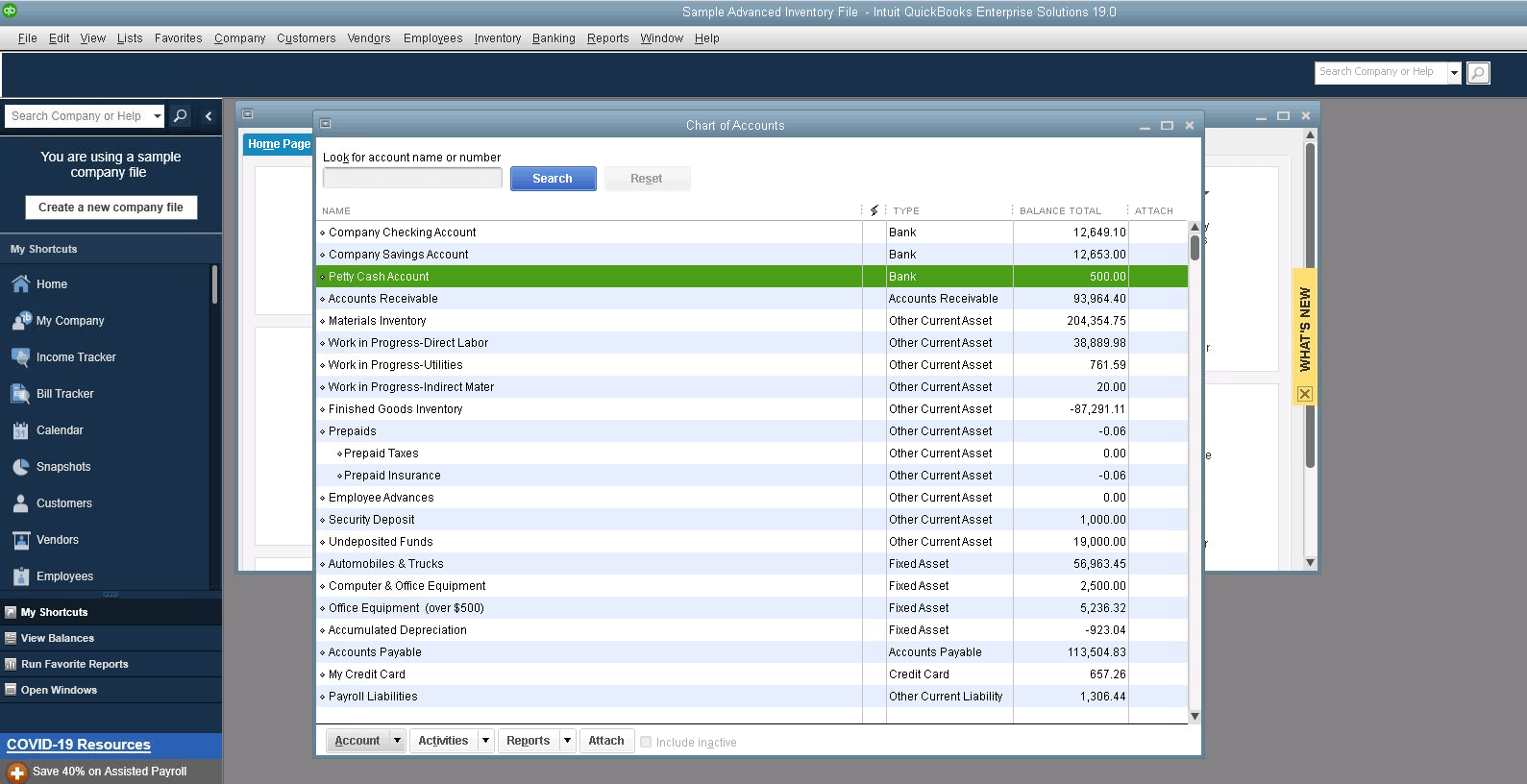
Of course, every business has some unique needs, so you can edit your chart of accounts to add or delete the defaults provided by QuickBooks Enterprise. However, you’ll have easy access to the balance sheet, income, and expense accounts common to most manufacturers.
As such, you don’t have to spend your valuable time creating a new chart of accounts for universal things like cash, accounts receivable, equity, sales income, rent, and repairs and maintenance.
2. Bill of Materials Cost Tracking
Usually, manufacturing involves combining inventory parts and supplies with building a product. The list of all the components that make that product is called a bill of materials (BOM) – it’s essentially like a shopping list and recipe for creating the final product to ensure the job is done right.
QuickBooks Enterprise for Manufacturing allows users to track BOM costs for each product the company manufactures, including labor, overhead, and even the cost of subassemblies.
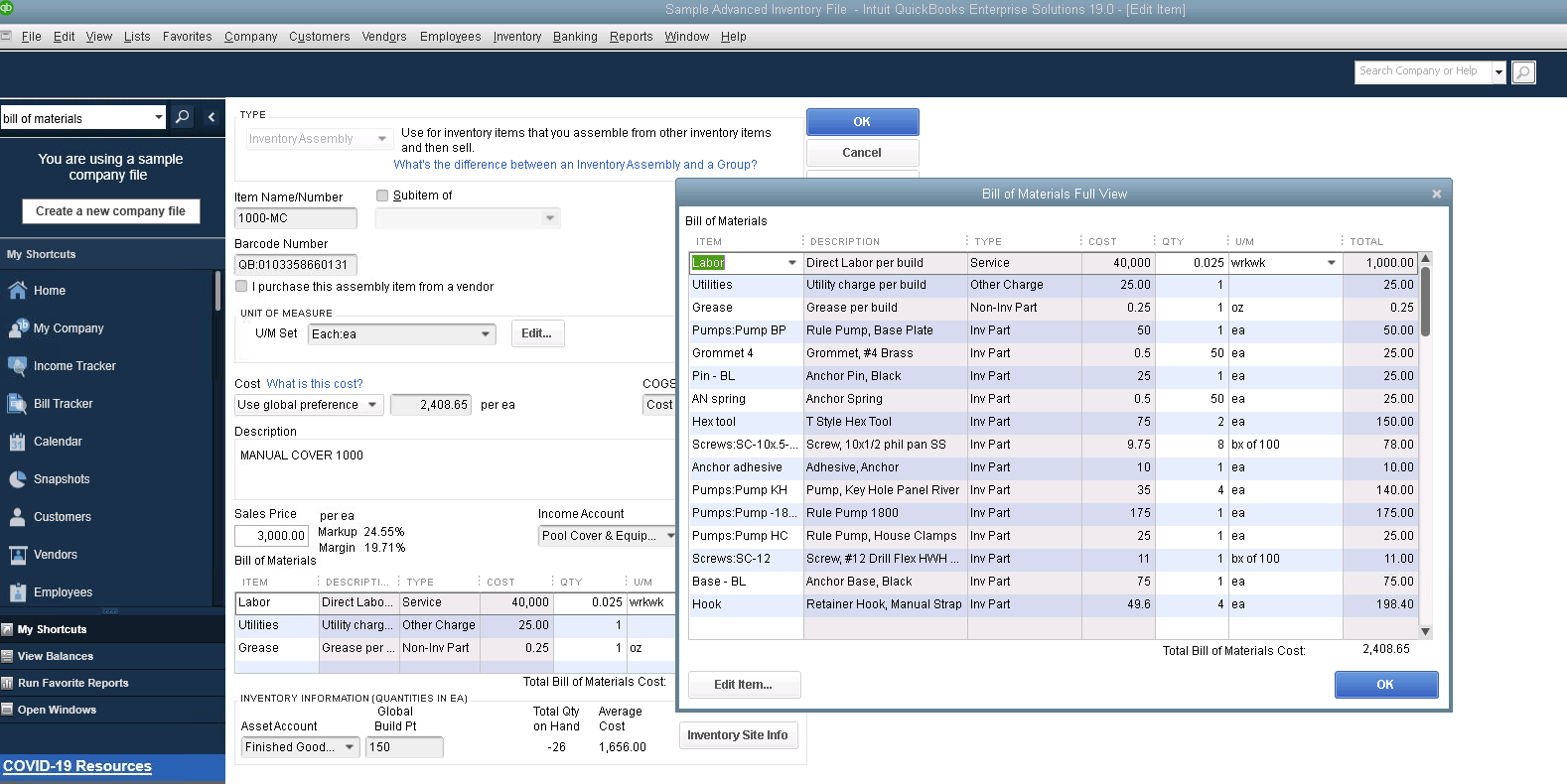
When the costs of specific components change, QuickBooks Enterprise can automatically update labor and materials costs, so you don’t have to update that information manually. In addition, you can track expenses using either FIFO or average cost accounting so that QuickBooks Enterprise can adapt to your inventory accounting methods.
Keep in mind that the BOM isn’t available in QuickBooks Online. Manufacturing businesses will need to use a desktop version of QuickBooks Enterprise to keep track of inventory for the materials used when manufacturing a product.
Also Read: Is It Possible To Buy QuickBooks Enterprise Without Subscription?
3. Available to Promise
Small manufacturers might have just one warehouse and a relatively small number of items in inventory, but as the business grows, so does its complexity. Eventually, you could have several warehouses, thousands of inventory items, and need to navigate a complex supply chain.
When that happens, available-to-promise supply chain management can help.
Available-to-promise (ATP) is a type of inventory analysis that allows manufacturers with complex operations to maintain low inventory quantities while maintaining availability for clients.
When you add an item to a sales order in QuickBooks Enterprise for Manufacturers, click the button in the Ordered column to activate ATP.
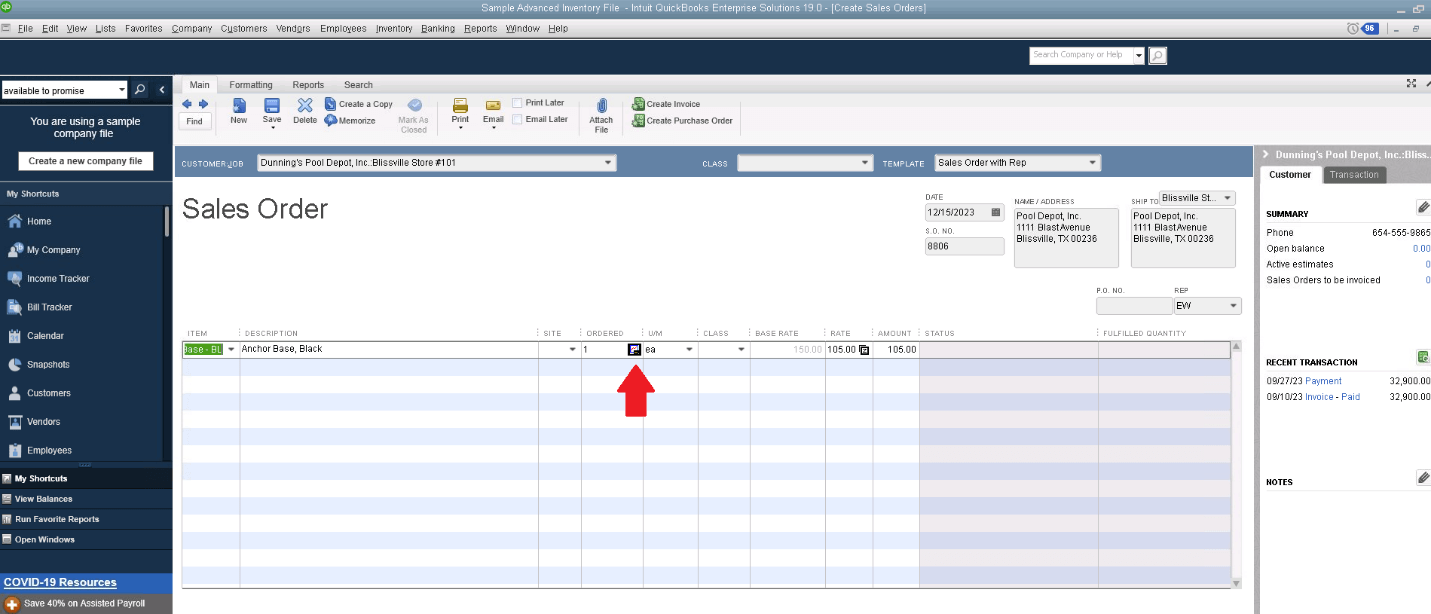
This brings up a screen that shows the total quantity of that item you have in hand, how many are currently on sales orders, the number of purchase orders, the quantity reserved for assembles, and the number available at each inventory site. As a result, the salespeople in your organization can efficiently respond to customer orders with accurate available inventory data and fulfillment projections.
4. Custom Price Levels
Every business owner knows that while all customers are important, some are more valuable than others. That’s why manufacturing businesses sometimes reward their best customers with custom pricing, offering discounts for high-volume or preferred customers.
Offering such discounts can be labor-intensive if your accounting software accommodates only one price level per product. But QuickBooks Enterprise for Manufacturers allows users to establish customized price levels so that you can set different prices for different customers.

This is another useful feature that isn’t available in QuickBooks Online or QuickBooks Pro. If you’re using one of those versions and constantly having to customize the prices for certain customers, upgrading to QuickBooks Enterprise and using the price-level function can save a lot of time.
5. Multiple Customer Shipping Addresses
Keeping your customers happy and running your business is crucial for the long-term success of any manufacturing business. So, what happens if your customer is a retail chain with multiple ship-to addresses?
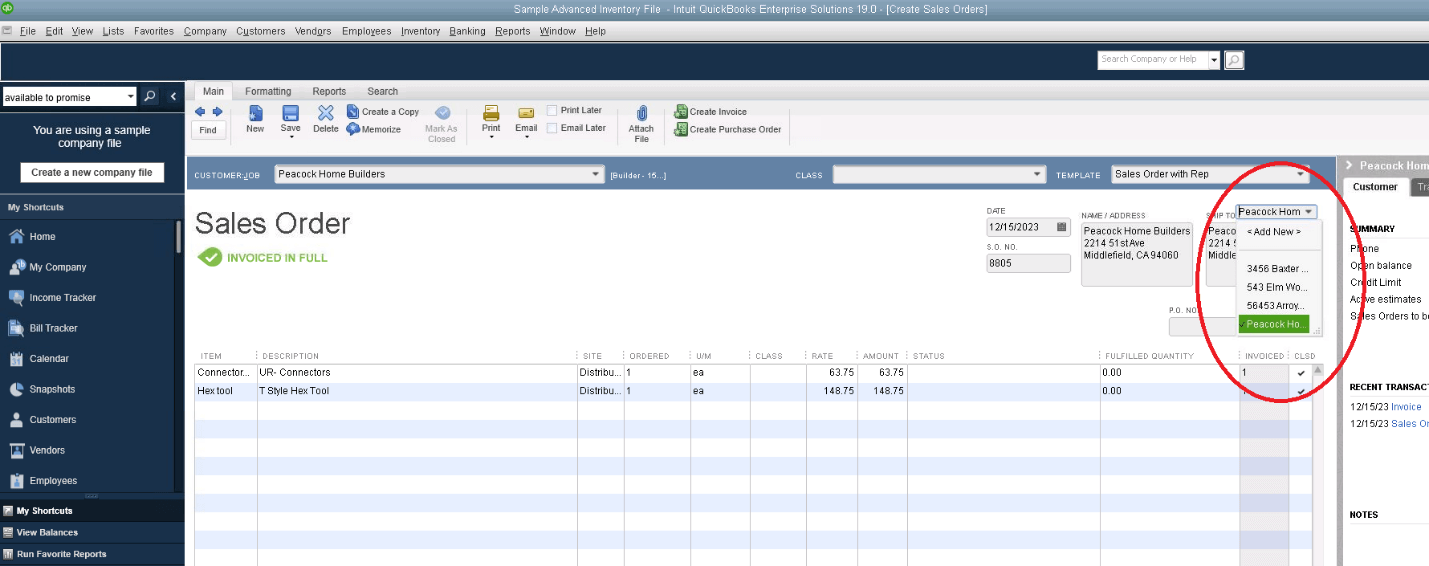
In some accounting software packages, that’s a problem. But not in QuickBooks Enterprise for Manufacturers. QBE for Manufacturers allows you to set up an unlimited number of shipping addresses for each customer. It becomes easy for you to accommodate customers with multiple stores or locations.
When it comes to generating a sales order, you select the correct shipping address from a drop-down menu in the ‘Ship To’ box. You can also add a new address at this point if your customer recently opened a new location, and you haven’t yet set up the system. Now, you can tailor your sales orders for each customer and each shipment address.
6. Key Manufacturing Reports
Reports provide critical information about your business and where it stands financially. One of the perks of using QuickBooks Enterprise has always been its robust reporting features, which allow business owners and stakeholders to customize and run powerful reports that aid in decision making.
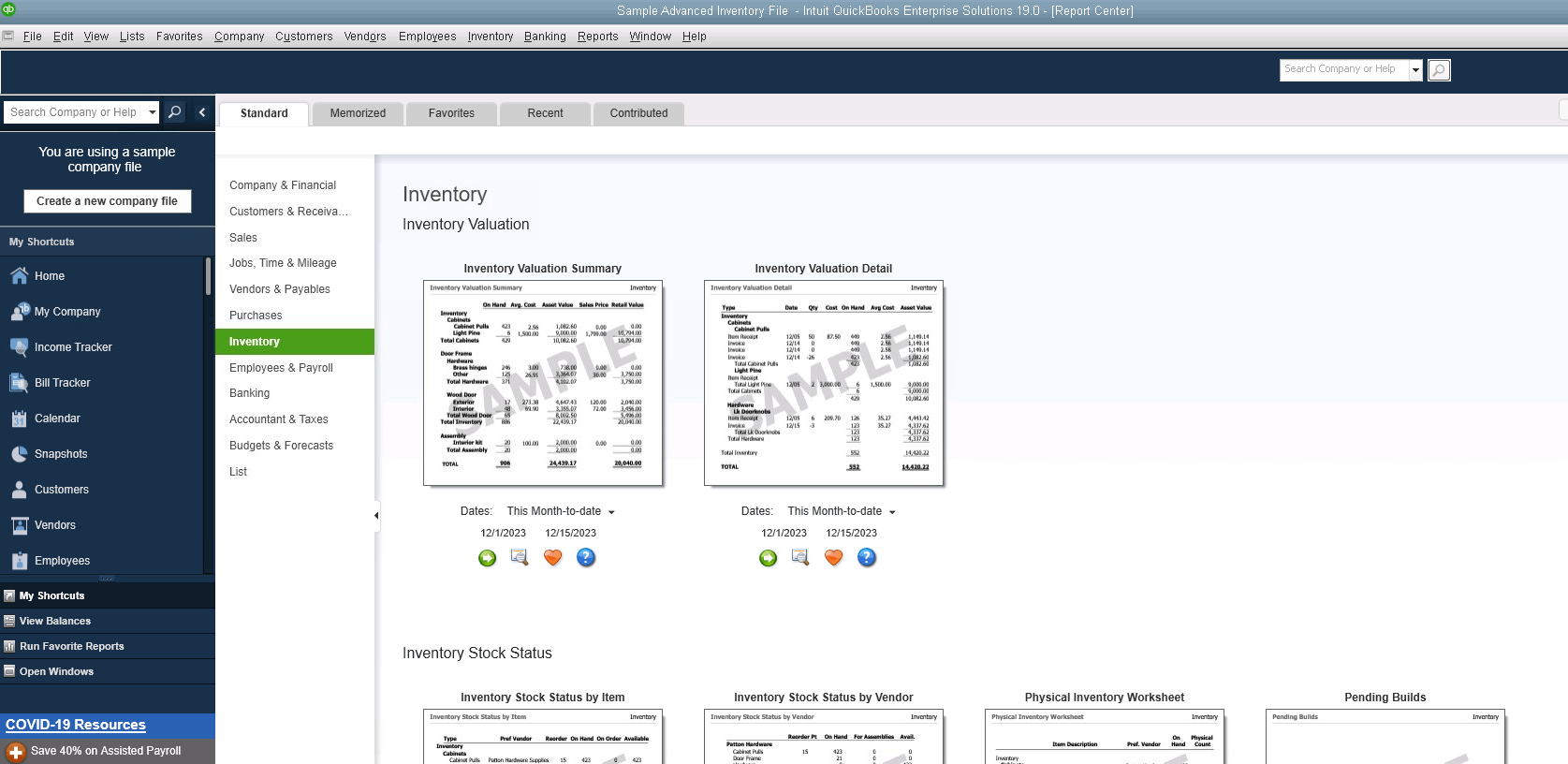
QuickBooks Enterprise for Manufacturers is no exception. The software comes pre-loaded with several report templates designed with manufacturing businesses into consideration. Examples include:
- Inventory Valuation Summary Report: This report shows what your inventory is worth, how much you have on hand, what it costs, and the current sales price. If you have slow-moving inventory taking up shelf space, this report will help you identify it to consider offering discounts to get it moving again.
- Inventory Stock Status by Item Report: Staying on top of how much inventory you currently have on hand is essential for keeping customers happy and orders flowing. With the Inventory Stock Status by Item Report, you can see what inventory you currently have.
You’ll also get insight into whether that inventory is committed to an outstanding sales order and how much is available for assemblies. - Assembly Shortage by Item Report: Component shortages can cause production delays, so you don’t want to start production when you don’t have enough raw materials or supplies to finish the run. That’s where the Assembly Shortage by Item Report comes in.
This report provides a snapshot of the inventory needed for critical assemblies and provides the next delivery date for items. A regular review of this report can help you focus on shortages that need to be handled before they start holding up production.
Those are just a few of the manufacturer-specific reports available in QuickBooks Enterprise. And since QuickBooks Enterprise comes with Advanced Reporting, you’ll have access to an extensive library of industry-specific reports. Besides, you can always build and customize the reports you need to get better insights into your business.
7. Backorder Tracking
No matter how well you manage inventory, occasionally, customers will place an order that requires stock or supplies that are not yet available. Improper tracking of those orders might often lead to a logistical nightmare. It will require you to keep records of all the outstanding sales orders with items on backorder and place rush orders for missing items.
QuickBooks Enterprise for Manufacturers makes tracking those backorders easy. On every sales order and invoice, you’ll see a backorder column showing exactly which items still need to be shipped. There’s also a backorder column on purchase orders showing what you are expecting to receive from vendors.
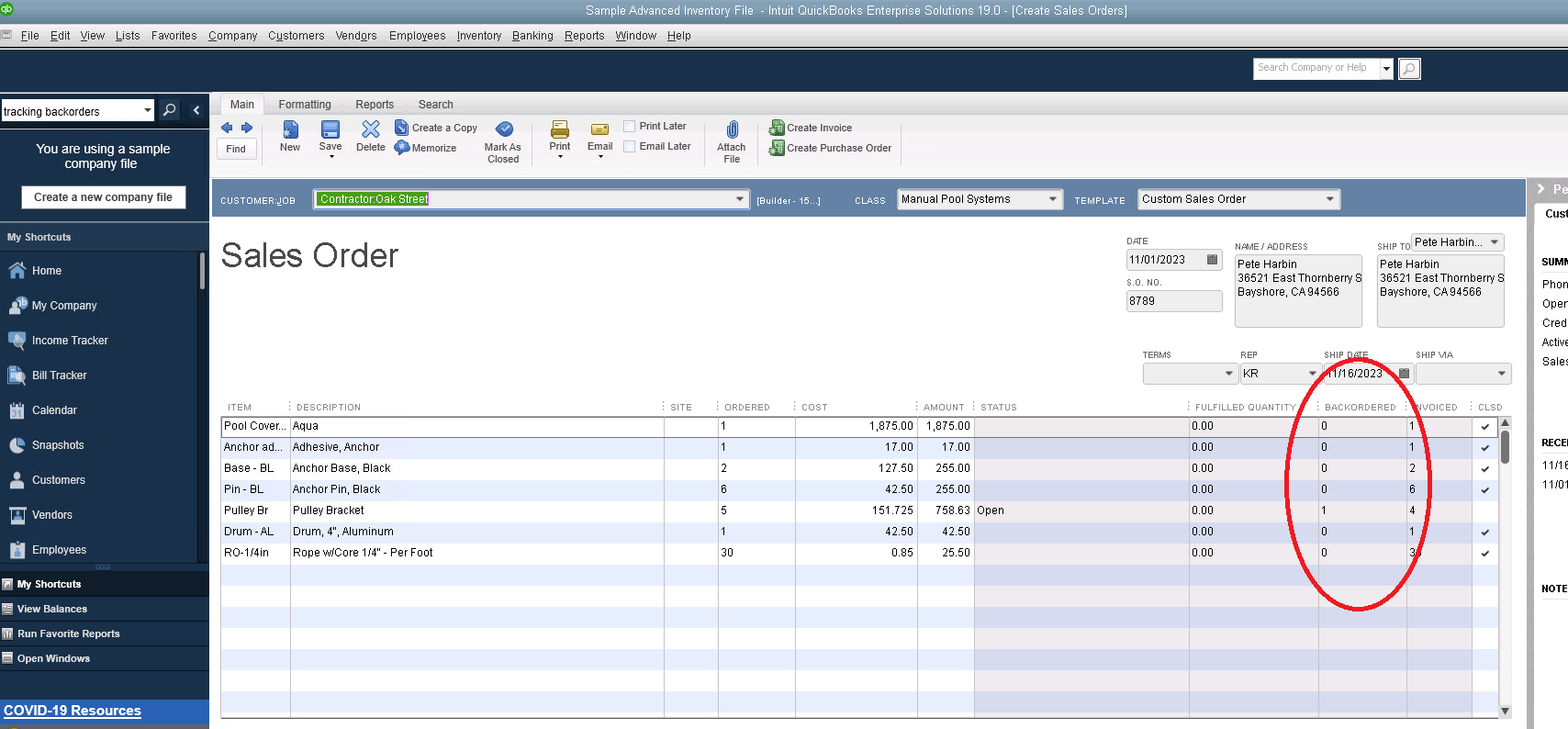
This can help you manage customer expectations, ensuring you can communicate delays before customers cancel orders.
8. eCommerce Integration
Many manufacturers today depend on e-commerce platforms. But if your e-commerce platform doesn’t integrate with your accounting solution, you’ll waste countless hours managing, tracking, and re-entering data between the two.
QuickBooks Enterprise integrates with some of the most popular e-commerce sites, including Shopify, Amazon, and WooCommerce. When your separate systems talk to each other, you can ensure that each sale, return, and addition to your stock will be automatically updated in your accounting software.
It also significantly reduces the time spent correcting data entry and shipping mistakes due to manually entered orders. This helps improve your operating efficiency and bottom line.
Also Read: Cloud in Manufacturing Industry Top 5 Benefits and Use Case
9. Mobile Barcode Scanning
With a mobile barcode scanning solution, every scan becomes an opportunity to streamline your entire warehouse workflow. As soon as a shipment arrives, workers can use handheld scanners or smartphones to capture item details, instantly logging receipts without paper or manual input.
Pickers receive dynamically updated pick lists on their devices so they know exactly which items to grab and where they’re located. All scans synchronize wirelessly in real time, giving managers up-to-the-minute visibility into stock movements, reducing fulfillment delays, and virtually eliminating data-entry mistakes.
10. Effortless Cycle Counting
Say goodbye to disruptive, once-a-year stocktakes and hello to continuous accuracy. Our cycle counting feature lets you divide your inventory into manageable segments and scan items in short, regular intervals—no shutdown required.
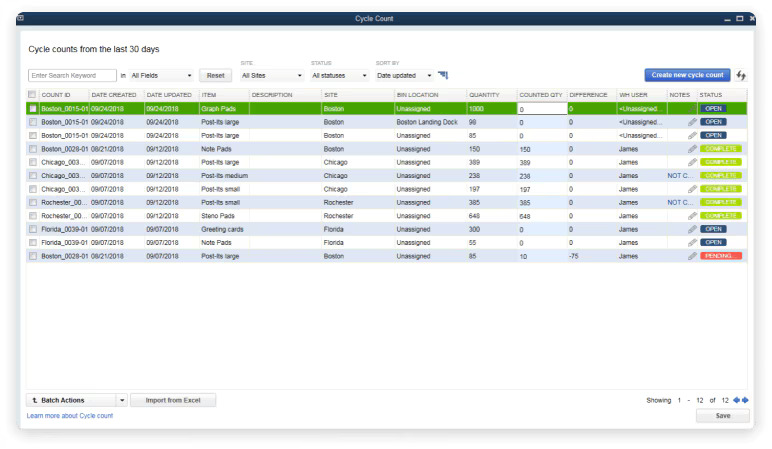
Each count is uploaded automatically to a centralized dashboard, where discrepancies are flagged and can be corrected on the fly. The result? A living inventory record that stays accurate day after day, fewer stockouts, and a clear audit trail that simplifies compliance.
11. New! Comprehensive Landed Cost
Understanding true product profitability just got easier. Our landed cost calculator factors in every additional expense—freight, customs duties, insurance, handling fees, and more—so you can see the real cost basis for each SKU.
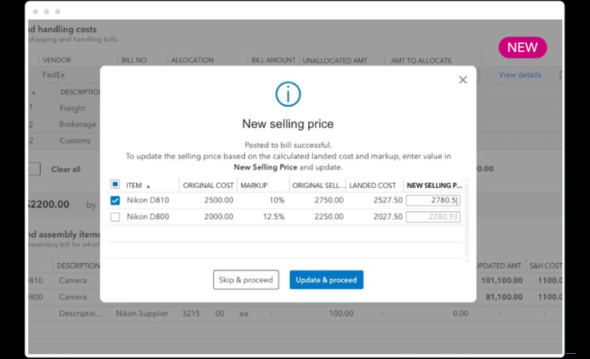
These costs are rolled into your inventory valuation automatically, saving hours of spreadsheet wrangling. Armed with precise margins, you can optimize pricing, negotiate better with suppliers, and prevent surprise costs from eroding profit.
12. Granular User Permissions
Protect your sensitive data without slowing your team down. Role-based permissions allow you to grant exactly the right level of access: warehouse associates can manage builds, fulfill orders, and run counts, while finance staff can see invoices and payroll.
You can drill down even further, restricting access to specific vendors, customers, or data fields so that every user only interacts with what matters to their role. This tailored approach keeps your operations nimble and your confidential information secure.
13. Salesforce CRM Connector
Bridge the gap between sales and finance with seamless bi-directional syncing. Customer records, opportunity stages, order statuses, and payment histories flow automatically between Salesforce and QuickBooks, ensuring both teams work from a single source of truth.
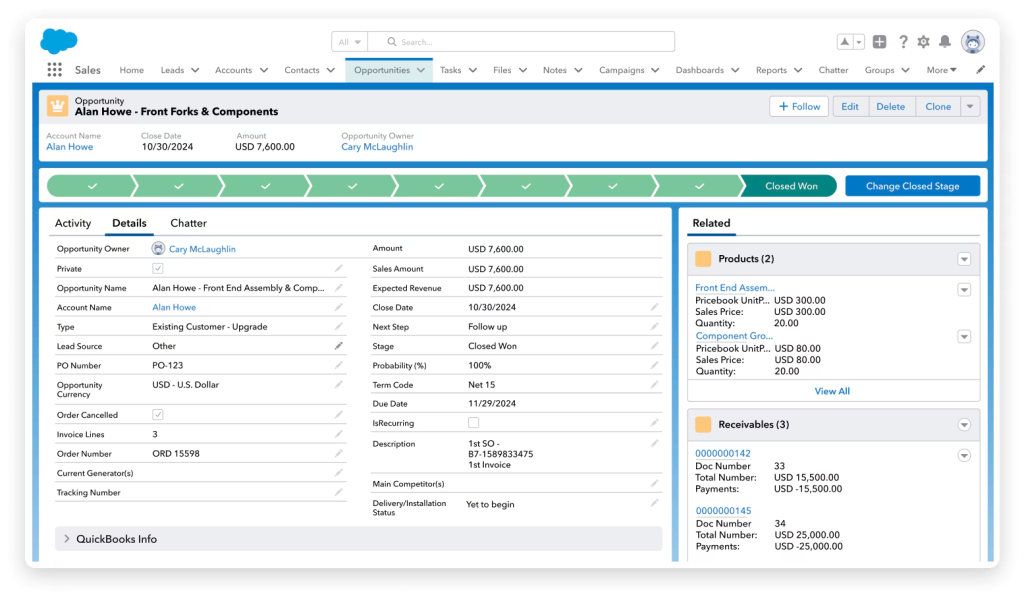
Your sales reps can check outstanding invoices and credit terms without leaving Salesforce, while finance sees the latest deal updates in QuickBooks. Plus, automated invoice generation means you spend less time chasing paperwork and more time closing deals.
14. Inventory Expiration Tracking
Reduce waste and liability by staying ahead of expiration dates. Assign lot numbers or serial codes with expiration data, then monitor them through customizable alerts and dashboard reports. When items near their shelf life, the system warns you so you can rotate stock or run targeted promotions.
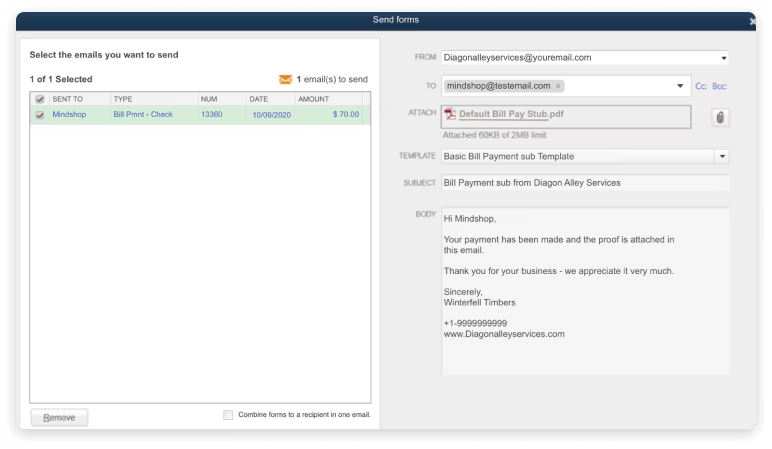
Transaction documents—packing slips, invoices, and customer communications—can display expiration details, keeping both warehouse staff and buyers informed and reducing the risk of shipping expired goods.
15. Simplified Multi-Company Reporting
Consolidate insights across all your business entities without manual juggling. Combine P&L statements, balance sheets, and custom reports from multiple QuickBooks files into one unified view.
Want to see just intercompany transactions for March? Filter by date, entity, or transaction type to drill down on what matters. This streamlined reporting lets executives and finance teams make strategic decisions faster—no more exporting, merging, or reconciling dozens of spreadsheets.
16. Easily Manage Customer Prepayments
Easily record and track customer prepayments and deposits on sales orders to boost your team’s productivity and improve financial accuracy. This feature ensures payments are automatically applied when sales orders are converted to invoices, reducing manual work and the risk of errors.
Integrating prepayments directly into your workflow allows your team to streamline their tasks and focus on more strategic initiatives while enhancing customer satisfaction through efficient financial management.
17. Centralized Source of Vendor Information
The Alternate Vendors Center provides a centralized and accessible hub for all vendor-related data, including contact details, item specifics, and pricing.
This feature allows you to swiftly import vendor list prices and reduce the time spent hunting down vital vendor information. Purchase orders can be created with vendor information automatically pre-filled, saving time and minimizing errors.
With new alternate vendor reports, you can gain even deeper insights by reviewing vendors within critical inventory reports, offering enhanced visibility and control over your supply chain management.
Final Words
Accounting for a manufacturing company is about more than just crunching numbers. It impacts everything from productivity to customer satisfaction and long-term profitability. That’s why you need the right accounting system in place.
QuickBooks Enterprise for Manufacturers comes with all the features and functionality you need to run your manufacturing business your way. If you think QuickBooks Enterprise for Manufacturers is the right fit for your company, reach out to one of our Solutions Consultants at +1-(855) 879-5481 for genuine licenses or try QuickBooks Enterprise with hosting.