
Table of contents Toc Icon
Table of contents Toc Icon
Modern digital tools make flexibility, security, and remote access essential for every business. But as businesses shift to hybrid and remote work, traditional desktops often fall short, creating high IT overhead, limited scalability, and rigid infrastructure. That’s why many organizations are adopting Desktop as a Service Solution for secure and fast remote access.
In this guide, we’ll cover everything you need to know about DaaS: what it is, how it works, its benefits, types of desktop models, pricing factors, key use cases, and more.
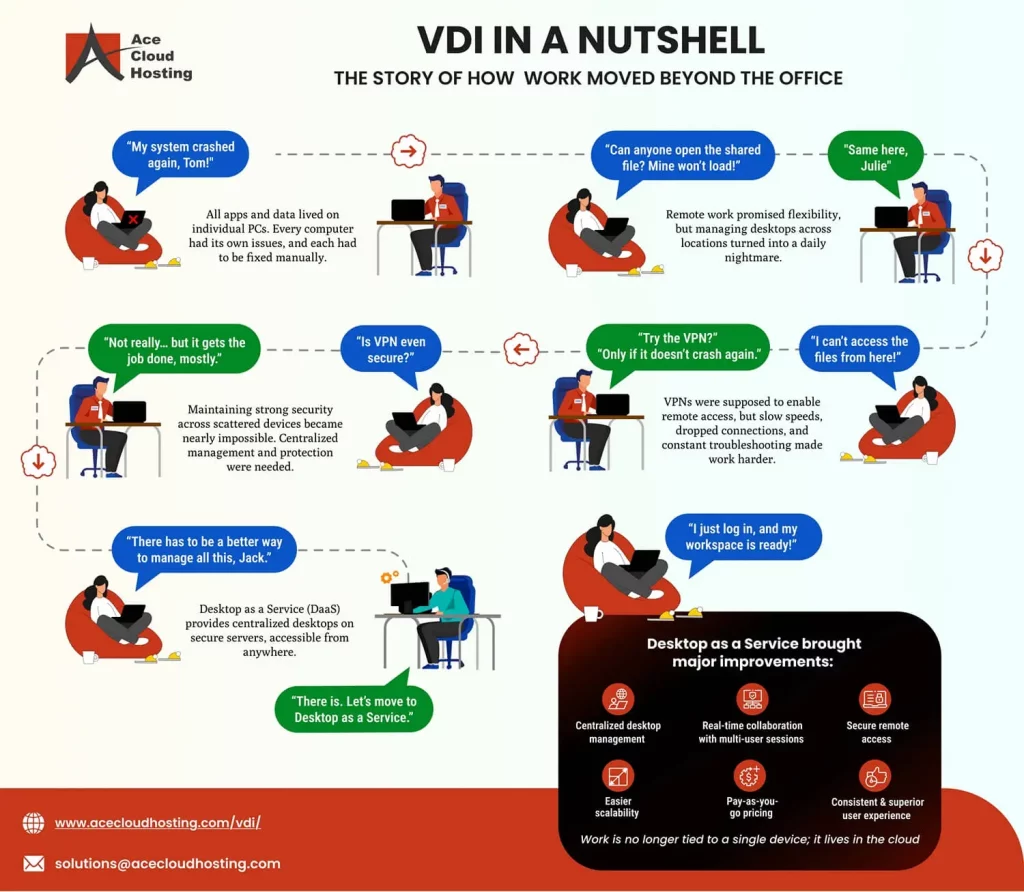
Let’s explore why most businesses are adopting DaaS solutions for secure remote work and fast performance.
What is Desktop as a Service (DaaS)?
DaaS is a cloud-based solution that delivers comprehensive virtual desktop environments, including the operating system, applications, files, and user preferences to end users over the internet.
These desktops run on virtual machines hosted in the cloud, all compute, storage, and networking infrastructure managed by a DaaS provider. Users can access their virtual desktops from nearly any device, including PCs, laptops, and more, making it ideal for today’s flexible work environments.
Traditionally, IT teams had to install and maintain operating systems and applications on every device. This model is time-consuming and costly and difficult to scale, especially for organizations with remote workforces from different regions.
DaaS addresses these challenges by providing a centralized, cloud-managed desktop experience. Employees enjoy consistent access to their work environment from any device, while IT maintains control, simplifies management, and improves security.
Types of Desktops in DaaS
Persistent Desktop
A Persistent Desktop in a DaaS environment is a virtual desktop that retains a user’s personal settings, data, and customizations across sessions. It behaves just like a traditional physical desktop when a user logs in, they see the same desktop layout, saved files, and installed applications every time.
This type of desktop is ideal for employees who need a consistent work environment, such as developers, accountants, or managers working with specific software tools or configurations. While persistent desktops offer a personalized user experience, they typically require more storage and management resources, making them slightly more expensive than non-persistent desktops.
Non-persistent Desktop
A Non-Persistent Desktop is a type of virtual desktop that does not save any user data or custom settings after the session ends. Each time a user logs in, they are provided with a fresh, standardized desktop image. This makes non-persistent desktops easier to manage, update, and scale, as there’s no need to maintain individual user environments.
They are ideal for task-based roles or scenarios where users don’t need a personalized experience, such as call centers, training labs, or temporary staff setups. Since they require fewer resources, non-persistent desktops are generally more cost-effective than persistent ones.
How Does DaaS Work?
A Desktop as a Service solution provides virtual desktops to users through the cloud. Instead of running a desktop on a local computer, the user accesses a virtual desktop on a remote server. The virtual desktop looks and functions like a traditional desktop, with a graphical user interface (GUI), desktop applications, and a file system.
When a user logs in to their virtual desktop, the DaaS provider allocates a portion of the server’s processing power, memory, and storage resources to the virtual machine running the desktop environment. This VM is then assigned to the user, who can use it as if it were their desktop.
The user can access the virtual desktop from any device with an internet connection, including laptops, PC, and more.
The virtual desktop is hosted in the cloud, meaning the DaaS provider is responsible for managing and maintaining the underlying infrastructure, including hardware, software, and security. This makes DaaS an attractive option for organizations that want to reduce their IT infrastructure costs and simplify desktop management.
The best DaaS providers typically offer a range of service levels, from basic desktop hosting to fully managed desktops that include software licensing, patching, and updates. Some DaaS providers, including Ace Cloud Hosting, also offer integration with other cloud services, such as storage, backup, and disaster recovery.
In this scenario, the end user’s data is safely stored in the cloud whenever they log off from the system. Every time they work on virtual desktops, the users get access to their data, no matter which device they use or their location.
Benefits of Desktop as a Service (DaaS): How It Empowers Your Business
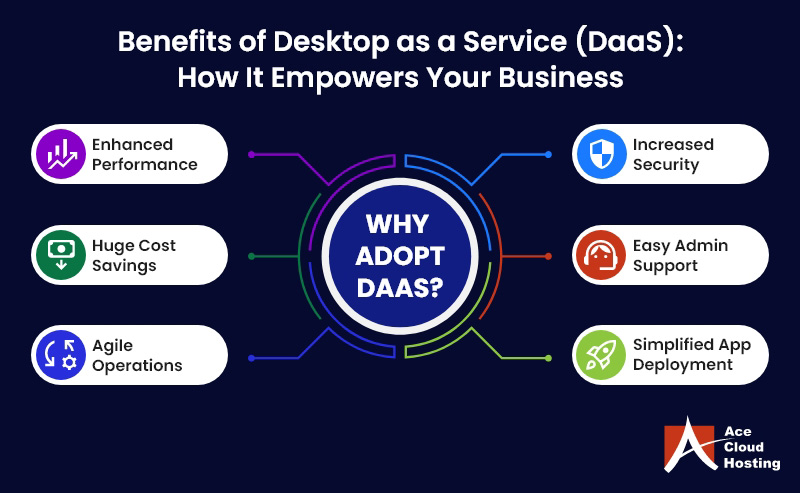
Desktop as a Service is a cloud-based solution that offers many benefits to organizations of all sizes. Here are some of the most compelling advantages of DaaS:
1. Enhanced Performance
DaaS providers use high-performance computing servers that are far more advanced than typical physical desktops. As a result, organizations can expect top-notch performance, even when running complex applications like 3D designs or engineering software. This increased performance can lead to increased productivity and user satisfaction.
2. Simplified Application Deployment and Configuration
Installing and configuring applications on physical desktops can be time-consuming and costly. DaaS streamlines this process by handling all the technical details for you. This can save your organization time and money, as you won’t need to invest in expensive application deployment technologies or a team of IT experts to manage the process.
3. Easy Administration and Support
With DaaS, many technical issues and performance constraints plaguing on-premises VDI solutions are shifted to the provider. Your organization won’t have to worry about infrastructure maintenance or technical support issues. Many DaaS providers also offer 24/7 support to ensure that any problems are resolved quickly and efficiently.
4. Increased Security
DaaS provides an extra layer of security by storing data in a secure, hosted environment rather than on vulnerable physical devices. DaaS providers also offer advanced security safeguards such as multi-factor authentication, intrusion detection and prevention systems, multiple firewalls, and data encryption. It also protects your organization’s data from potential cyber threats.
5. Improved Business Agility
With DaaS, your organization can quickly and easily adapt to changing business needs. DaaS is scalable and provides a pay-as-you-go Subscription model, which means you only pay for what you need. It’ll help your organization stay agile and competitive in today’s fast-paced business environment.
Is DaaS Secure for remote work? Know How!
Differences Between DaaS and VDI
Desktop as a Service (DaaS) and Virtual Desktop Infrastructure are different approaches to delivering virtual desktops to end users.
While both technologies allow remote access to desktop environments, they differ significantly. One major difference between DaaS and VDI is that DaaS is a subset of virtual desktop infrastructure (VDI) delivered as a subscription model.
1. Ownership and Control
When it comes to ownership and control, VDI requires a significant investment in hardware, software, and maintenance. The organization is responsible for setting up and managing the entire VDI infrastructure, including servers, storage, networking, and virtualization software. It can be a costly and time-consuming process, requiring specialized IT skills.
On the other hand, DaaS eliminates the need for organizations to purchase, manage, and maintain hardware and software infrastructure.
The DaaS provider manages the infrastructure and virtual desktop environment, allowing the organization to focus on its core business operations. It also means the organization needs more control over the infrastructure and virtual desktop environment.
However, this can also be seen as an advantage, as the organization can benefit from the DaaS provider’s expertise and experience in managing the infrastructure and ensuring security and compliance.
2. Lower TCO
When it comes to Total Cost of Ownership (TCO), DaaS often comes out as the more cost-effective option than VDI. VDI requires a dedicated IT infrastructure, including hardware and software, which can be costly to acquire and maintain.
On the other hand, DaaS offers a pay-as-you-go model, where users only pay for what they use. It can be particularly advantageous for businesses with fluctuating workforce needs.
3. Scalability
VDI requires significant planning and infrastructure investment to scale up or down to meet changing business needs.
However, DaaS providers can scale resources up or down as needed, allowing organizations to meet demand fluctuations without the hassle of managing and maintaining their infrastructure.
4. Performance
While VDI can offer better performance due to dedicated infrastructure, DaaS has made significant strides in recent years, making it a more viable option for organizations. DaaS providers now utilize advanced virtualization technologies and high-performance hardware to ensure customers can access resources that meet their requirements.
While VDI may have an edge in terms of performance due to dedicated infrastructure, DaaS providers have closed the gap significantly, providing high-performance virtual desktops that meet the needs of most organizations.
DaaS vs. VDI: Which Is Better?
VDI is managed by in-house IT staff, while DaaS requires a third-party provider to deliver a managed virtual desktop solution to the users. VDI is deployed in an on-premises data center, unlike DaaS, which provides virtual desktops remotely.
A VDI solution commonly requires an upfront investment in deployment and configuration. However, VDI is often turned into DaaS to simplify the struggles associated with implementation.
VDI is often regarded as a more challenging infrastructure from a technical standpoint. Therefore, DaaS is preferred by small and medium enterprises as they gain significant advantages from it, including cost, security, management, and many more.
To know more about which one suits your business needs, read this: Difference Between DaaS vs. VDI
What Are the Use Cases of Desktop as a Service?
Desktop as a Service has revolutionized business operations by offering an efficient and cost-effective solution for their IT needs.
With DaaS, companies can access their desktop environment and applications securely from anywhere, at any time. This flexibility has opened a world of possibilities for organizations, enabling them to streamline operations and enhance productivity.
Here are some of the most common use cases of DaaS:
1. Bring Your Own Device (BYOD): Enabling Secure Access to Resources Anywhere, Anytime
The current scenario of BYOD is the culmination of two developments, where users can access official resources from any device with the power of the cloud.
As firms of all sizes embrace this computing model, DaaS ensures employees can be productive, regardless of any chosen device. It allows firms to provide workforce access to resources they require, especially traveling employees, while simultaneously regularizing security and support.
Recommended Reading: Why BYOD (Bring Your Own Device) is essential for a Remote Workforce?
2. Mobile Workforce: Enhancing Productivity of Mobile Workforce
Businesses that work towards full-time productivity from remote employees feel the most significant demand for having DaaS in their system. The workforce’s productivity is limited to physical desks and personal devices such as laptops, mobile phones, and tablets.
In DaaS, data resides in the cloud and can be accessed from any secure device. It aims to enable secure access to software, applications, and data on virtual desktops hosted in the cloud rather than on-premises. DaaS has advanced cloud-centric storage systems to ensure sensitive information is stored on a secure cloud server, adding more protection layers.
3. Digital Security: Securing User Access and End-to-End Encryption
In 2024, human error became a more significant factor in data breaches than technological flaws, with 95% of incidents attributed to human mistakes. Thus, it’s unsurprising to note that this number has increased if compared with last year’s data and will continue to grow.
Flexible work environment is becoming the new normal as organizations let employees leverage an anywhere, anytime work environment.
IT leaders are turning to DaaS to support hybrid workforces—relying on secure access and data sharing to stay connected across distributed teams. But the real challenge lies in building a secure and sustainable DaaS model that stands for longer run.
Virtual desktops showcase how strong access controls and end-to-end encryption can significantly reduce exposure to cyber threats and strengthen overall security posture.
4. Business Continuity – Ensuring Quick Restoration of Data During Disasters
DaaS solution has built-in redundancy to maintain business continuity during and after a local disaster. Data is backed up and replicated in multiple data centers to restore quickly in case of mishaps, helping them stay productive even out of the office.
Recommended Reading: How Does Virtualization Help Disaster Recovery
How DaaS Eliminates Surprise Costs: Check out the Pricing Benefits
The Desktop as a Service (DaaS) model is a fully managed deployment of virtual desktops from migration to security. They are created and maintained on a third-party cloud-hosted server and delivered as a fully managed VDI (Virtual Desktop Infrastructure) that can quickly replace on-premises VDI.
The DaaS provider manages the deployment, administration, and upgrading of virtual desktops, which removes the necessity to invest in high-end hardware like servers and costly desktops to accommodate increasing hardware demands.
DaaS comes to the rescue with slashed capital expenses and effortless IT expenditure- different RAM, storage, and memory. While DaaS pricing varies from vendor to vendor, DaaS costs are much lower than traditional VDI.
Recommended Reading: Understanding how VDI pricing works
Factors Influencing Desktop as a Service Pricing
1. Number of Users: Pricing typically follows a per-user, per-month model. Larger user bases may qualify for volume discounts.
2. Desktop Type (Persistent vs. Non-Persistent)
- Persistent desktops are more expensive due to higher storage and customization needs.
- Non-persistent desktops are more cost-effective for temporary or task-based roles.
3. Resource Allocation: Higher CPU, RAM, and storage requirements increase costs. Users such as developers and designers require more resources than standard users.
4. Licensing and Software: Costs may include licensing for the OS (e.g., Windows), Microsoft 365, third-party apps, and antivirus.
5. Data Storage & Backup: Additional charges may apply based on data storage volume and backup retention policies. High-performance storage (e.g., SSD) also increases costs.
6. Security and Compliance: Advanced security features like multi-factor authentication, encryption, endpoint protection, and compliance certifications (e.g., HIPAA, SOC 2) can add to pricing.
7. Support and Management: Fully managed services with 24/7 support, patching, monitoring, and troubleshooting are generally priced higher. Self-managed or basic support models are cheaper.
8. Geographic Location: DaaS Pricing may vary by region, depending on local data center costs, regulations, and tax implications.
9. Integration & Customization: Customized environments, third-party integrations, or specific network setups may incur additional setup and management fees.
10. Contract Duration: Longer-term contracts (1–3 years) often come with discounted pricing compared to monthly commitments.
How Does DaaS Solution Fit Every Industry?
As industries increasingly shift to the virtual world, DaaS is becoming a game-changer for modern workplaces. Let’s explore five sectors that gain more benefit by adopting the DaaS model.
1. ITES
Centralized desktops make it feasible for ITES firms to simplify and downsize the cost of administration and maintenance while making room for flexibility in resource utilization.
Ace Cloud Hosting offers managed virtual desktops and apps that can be integrated more rapidly to support remote work. This solution sustains data security and backup in case of disruption to ensure business continuity.
2. Education
The education industry can never go down. Even during the pandemic, schools and institutions were offering education online.
Desktop as a Service lays a better ground for research and collaboration from anywhere globally. Moreover, educational institutions can’t provide devices to students; therefore, multiple-device compatibility enables users to study from remote locations.
Download e-Book Virtual Desktops for Education to Supercharge E-learning
3. Healthcare
Healthcare is considered the most sensitive industry, and every patient’s data is essential. DaaS offers better data security by storing it in highly secure servers. Doctors can access patients’ medical reports and records even during emergency visits.
Recommended Reading: Driving Pharma’s Digital Success With The Power Of Virtual Desktops
4. Law
In this hybrid cloud world, the law industry constantly moves. Cloud desktops enable law firms to have a cloud-ready environment to collaborate with clients and access different types of applications on the cloud, such as Abacus Law, Amicus Attorney, and more.
5. BPO
In the BPO industry, agility is everything. With fluctuating agent demand, onboarding and offboarding quickly can make or break service delivery. Desktop as a Service (DaaS) allows BPOs to instantly scale desktops up or down based on project needs—no hardware delays, no IT bottlenecks.
Sensitive client data is protected through centralized security policies, role-based access, and activity monitoring, all managed from a single interface.
Whether your agents are remote or on-site, DaaS ensures consistent performance and secure access to all apps and data. As BPOs embrace hybrid models and global talent, DaaS offers the flexibility, control, and data protection they need without the overhead of physical infrastructure.
Download e-Book Secure Hybrid Work for BPO Companies: Ace Cloud Hosting’s DaaS Facilitates Real-World Foundations
Finance
Virtual desktops power financial institutions with a fully secure and managed digital workspace. Financial services companies are the most prone to cyberattacks.
Thus, banks and insurers gain centralized security controls and instant access to apps, data, and communication on any device, network, and cloud.
Leverage Secure, Super-performing Desktop as a Service for Your Firm with Ace Cloud Hosting
Ace Cloud Hosting provides 24/7 managed DaaS solutions on the Citrix platform, supporting on-premises and cloud-based deployments. Our team provides pooled and dedicated desktops with enterprise grade security, scalability, and less IT overhead cost.
Ace Cloud Hosting’s virtual desktops have an extremely low total cost of ownership (TCO), making them suitable for any business, regardless of size and industry.
Be ready to work seamlessly on thin clients without worrying about performance. If you want to know more about how DaaS supports your business in the long run, consult our experts, who will guide you through every step.
Frequently Asked Questions
How much does Desktop as a Service cost?
The pricing of Desktop as a service ranges from $32-$100, depending on the configuration you opt for and the customization required.
What is SaaS vs DaaS?
Software as a Service (SaaS) is focused on delivering software applications to users. On the other hand, Desktop as a Service enables a comprehensive desktop experience that users can access from anywhere. SaaS is application-focused, and DaaS is virtually desktop-focused.
Is DaaS software?
No, DaaS is not software. It is a secure environment created by hosting desktops on a centralized server. DaaS is delivered as a hosted solution to the users, wherein the DaaS provider takes care of all IT management tasks.
Is Citrix a DaaS?
Citrix is one of the top DaaS providers, offering cloud applications to users without complicating IT or compromising security.












Comments (4)
One thing that most DaaS solutions struggle with is servicing those who are disabled (visual/hearing impaired) who rely on local assistive technology (example, navigation software like JAWS). WCAG standards are geared towards typical web experiences and passing remote desktops/apps are not clearly addressed by their best practices. Would love to see DaaS platforms address these challenges as a priority. VMware has a VPAT, but it simply states that various aspects are not supported.
The remote accessibility that is provided by DaaS is a considerable benefit that is not given attention to by many people. It is one of the most underrated benefits of DaaS that will enhance how we work.
The framework of DaaS is terrific and offers enormous benefits to the users. The future is here.
With the responsibility of the servers going to the cloud providers, DaaS is for sure going to gain a lot of attention and popularity in the coming time.