Table of contents Toc Icon
Table of contents Toc Icon
QuickBooks Online is the financial nerve center for millions of businesses, and an unexpected outage can disrupt critical accounting workflows. If you’re unable to sign in, experiencing slow performance, or wondering, “Is QuickBooks Online down today?”, it’s important to check whether the issue is a widespread outage or something specific to your system before troubleshooting.
In this blog, we’ll walk you through three ways to check the status of QuickBooks Online, whether you’re using Simple Start, Essentials, Plus, or Advanced. We’ll also cover common troubleshooting tips to help you identify and resolve access and performance issues so you can get back to work.
Run QuickBooks Desktop in a managed cloud environment with secure remote access, backups, and 24/7 support.
Common Causes of QuickBooks Downtime
Several factors can affect QuickBooks Online’s availability, from server-side outages and scheduled maintenance to issues with your own internet connection. Here are some common reasons you may experience downtime or performance problems.
- High Server Traffic: When too many users access QuickBooks Online simultaneously, heavy traffic can strain server resources and potentially affect performance. This may result in slow loading times, unresponsive pages, or QuickBooks Online getting stuck on the loading screen.
- Server Issues: Technical problems with the infrastructure supporting QuickBooks Online can cause temporary service disruptions. Server failures, configuration errors, or other infrastructure-related issues may prevent users from signing in or accessing certain features.
- Software Bugs: Like any cloud-based application, QuickBooks Online can experience software bugs or glitches that affect its functionality. These issues may cause unexpected errors, slow performance, or certain features to stop working until Intuit releases a fix.
- Network Problems: QuickBooks Online requires a stable internet connection. If your local network is slow, unstable, or experiencing an outage, you may have trouble signing in or using the application, even when QuickBooks Online itself is operating normally.
- Power Outages: Power failures affecting the data centers or infrastructure supporting QuickBooks Online can potentially cause service interruptions. Although data centers typically have backup power and redundancy systems, major infrastructure failures can still affect service availability.
- Scheduled Maintenance: Intuit periodically performs maintenance and software updates to improve QuickBooks Online’s performance, security, and functionality. During certain maintenance activities, some features or services may become temporarily unavailable.
What To Do When QuickBooks Online Is Down?
If QuickBooks Online isn’t working, first check whether Intuit has reported a service outage. If the service is operational, the issue may be related to your internet connection, browser, or device. Here are some troubleshooting steps you can try:
- Check Your Internet Connection: Make sure your internet connection is stable, and other websites are loading properly.
- Restart Your Computer: Restart your device to refresh the system and resolve temporary issues that may affect QuickBooks Online.
- Clear Browser Cache and Cookies: Outdated or corrupted browser data can interfere with QuickBooks Online. Clear your browser’s cache and cookies, then try signing in again.
- Try a Different Browser: If the issue persists, access QuickBooks Online using another supported browser to determine whether the problem is browser-specific.
Checking Intuit QuickBooks Online Status
Official Status by QuickBooks
Intuit has an official status page that serves as a centralized platform to keep users informed about ongoing incidents, service disruptions, or scheduled maintenance. By checking this page, you can stay updated on the status of QuickBooks (Desktop, Self-employed, Online & Intuit Enterprise Suite) and its availability in your region.
To check the real-time status of QuickBooks, follow these simple steps:
Step 1: Visit the Official Intuit website at https://status.quickbooks.intuit.com/.
Step 2: Click on the “Subscribe to Updates” tab located in the top right corner (refer to Fig. 1).
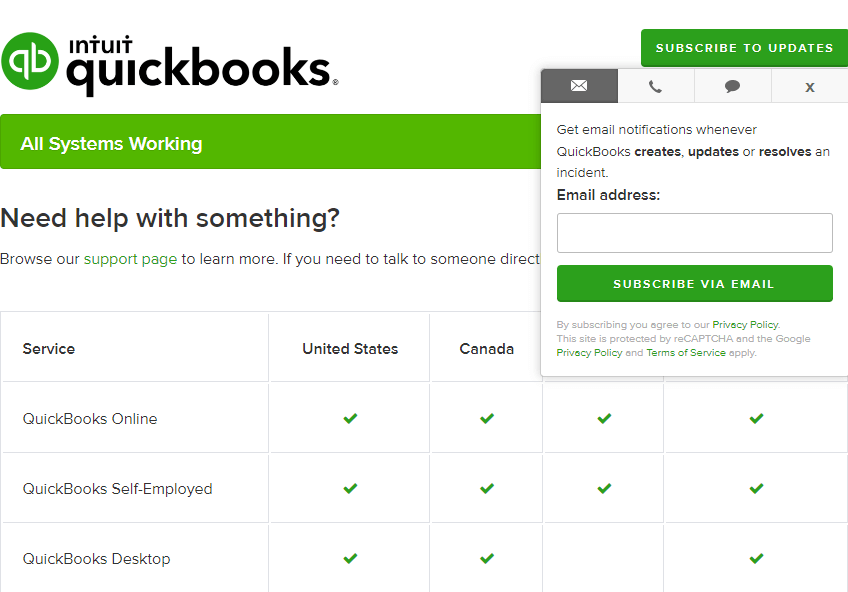
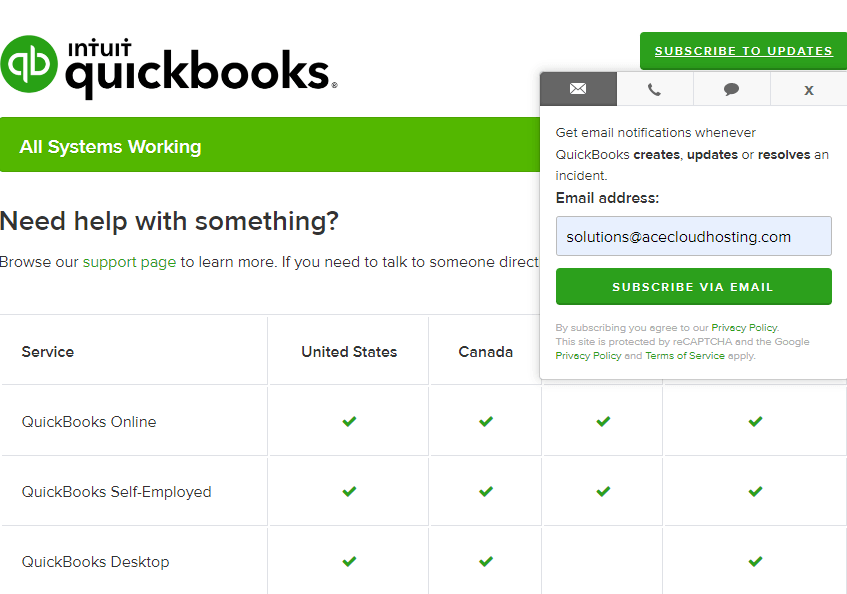
Step 3: Enter your email address to subscribe for updates via email (refer to Fig. 2).
Step 4: You can also subscribe to updates via text message (refer to Fig. 3).
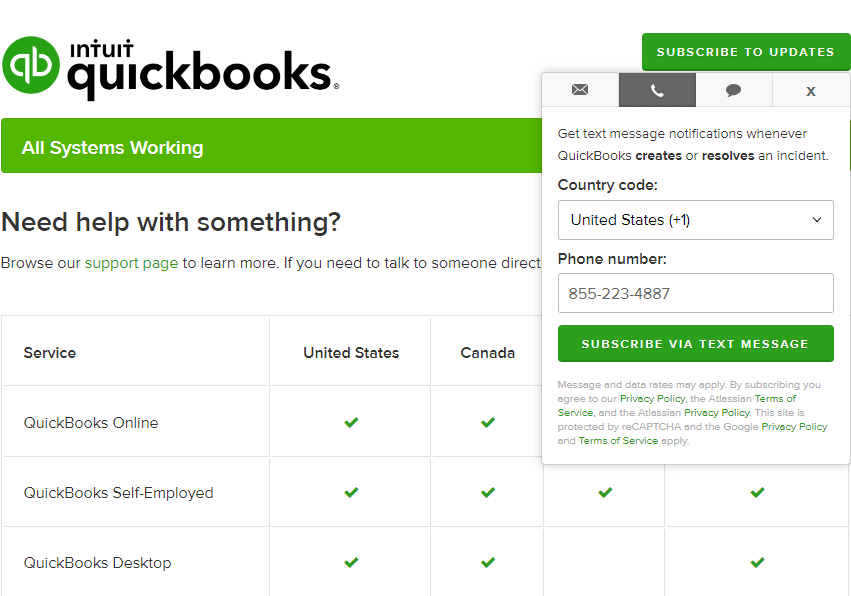
After subscribing, Intuit will send you real-time updates on QuickBooks’ status, including downtime, maintenance schedules, and service restoration updates.
Downtime & Incident History
| Month | Incidents | Status |
| September 2026 | Duplicate transactions affecting some Payroll and Payments customers | Resolved |
| Aug 2026 | Some QuickBooks users receive errors and are unable to view transactions when searching. | Resolved |
| July 2026 | QuickBooks Online Login Issue | Resolved |
| Jun 2026 | QuickBooks Desktop Payroll updates returning Internet connection error | Resolved |
| May 2026 | QuickBooks Online Payroll – Intermittent Issue | Resolved |
| April 2026 | Unable to access Expense Transactions menu | Resolved |
| March 2026 | Issues with tax calculation | Resolved |
| Feb 2026 | Unable to use multiple features in QuickBooks Online | Resolved |
| Jan 2026 | QuickBooks Online Accountant issue accessing clients and being redirected to the login page | Resolved |
Third-party Sites for checking the status of QuickBooks
Apart from the official sites by QuickBooks and Intuit, there are many reliable and up-to-date third-party sites that keep a tab on the status of QuickBooks downtime.
A few of these third-party sites are mentioned below:
This site gives QuickBooks status at the top of the view. Also, users can report their issues in categories like tax filing, app, login, and website, and rate their experience for the last 90 days (about 3 months). The star feature of this site is a live QuickBooks Online outage map.
Down Detector by Ookla is also one of the reliable sites that shows live reports of QuickBooks Online outages. One can view the outage reported by users either in chart format or a heat map. Their famous mobile apps are available for both Android and iPhone users.
This website is good at providing information, but it doesn’t have a great UI. Unlike other sites, it provides the option to rate QuickBooks on the site itself. Also, it has an active live stream of comments by QuickBooks users.
Here is a list of other sites for checking and reporting the status of QuickBooks or QuickBooks Online downtime:
- https://isdown.app/integrations/quickbooks
- https://statusgator.com/services/quickbooks
- https://downforeveryoneorjustme.com/
- https://updownradar.com/status/qbo.intuit.com
- https://outage.report/quickbooks-intuit
- https://isdownstatus.com/status/intuit.com
- www.saashub.com/quickbooks-online-status
Community Sites for Checking QuickBooks Status
There are more ways to know why your QuickBooks Online isn’t working, responding, or down. You can either check the official communities by Intuit and QuickBooks or visit the social media platforms.
Besides the status page by QuickBooks, you can either visit:
- QuickBooks US Community for any reported incident of QuickBooks Online being down
- Twitter handle of QuickBooks for any tweets related to QuickBooks Online downtime
- Help Article about the working status of QuickBooks
- Dedicated Support page for QuickBooks Online
Apart from the resources by QuickBooks and Intuit themselves, you can also follow the QuickBooks Online Down community on Reddit.
Host QuickBooks Enterprise in the cloud for anywhere access, managed infrastructure, 45-day backups, and 24/7 support.
Simplify Your Accounting Workflow with Ace Cloud Hosting
QuickBooks Online outages can be frustrating, especially when your team depends on it for day-to-day accounting work. While occasional service disruptions are part of any cloud-based platform, recurring performance or availability concerns may prompt businesses to evaluate alternatives.
For firms that want more control, advanced features, and the familiarity of desktop accounting software, QuickBooks Desktop Enterprise can be a strong alternative to QuickBooks Online. If remote access matters, cloud hosting for QuickBooks Enterprise can provide a similar anywhere-access experience while giving your team a dedicated, managed environment.
With Ace Cloud Hosting, you can run QuickBooks Desktop Enterprise in the cloud and access it securely from anywhere, while benefiting from managed hosting, backups, security, and 24/7 support.
If you manage QuickBooks Online alongside multiple accounting and tax applications, Ace Cloud Hosting can bring your applications together in a secure, fully managed cloud workspace, giving your team centralized access from anywhere, enterprise-grade security, and 24/7 technical support for your hosted environment. Explore Cloud for QuickBooks Online.
Frequently Asked Questions (FAQs)
How long does it take Intuit to fix a QuickBooks Online outage?
The time required to restore QuickBooks Online depends on the cause and severity of the outage. There is no fixed restoration time for every incident.
Can I access QuickBooks Online during an outage?
It depends on which services are affected. A partial outage may prevent you from using specific features while other functions remain available. During a widespread outage, you may be unable to sign in or access your company data until Intuit restores the affected services.
Why does QuickBooks Online not load?
QuickBooks may fail to load because of several common issues: corrupted cache or cookies that block proper loading; special characters in the company name that cause errors; or having multiple browser tabs open, which can interfere with QuickBooks functioning correctly.
Why is QuickBooks just spinning?
A spinning wheel in QuickBooks often indicates:
- Corrupted browser cache: Clearing your browser’s cache can resolve this.
- Multiple tabs open: Ensure only one tab is accessing QuickBooks.
- Unstable internet connection: Check internet speed and retry loading QuickBooks.
Is the Intuit system down today?
As of now, all Intuit systems are operational. There are no reported outages or service interruptions.
Is QuickBooks closing down?
No, QuickBooks Online is not closing down. However, Intuit has announced the discontinuation of certain QuickBooks Desktop versions for new subscribers in the U.S. after September 30, 2024. Existing subscribers can continue to renew their subscriptions.