
Table of contents Toc Icon
Table of contents Toc Icon
“Cloud Will Be the Centerpiece of New Digital Experiences”, says Gartner
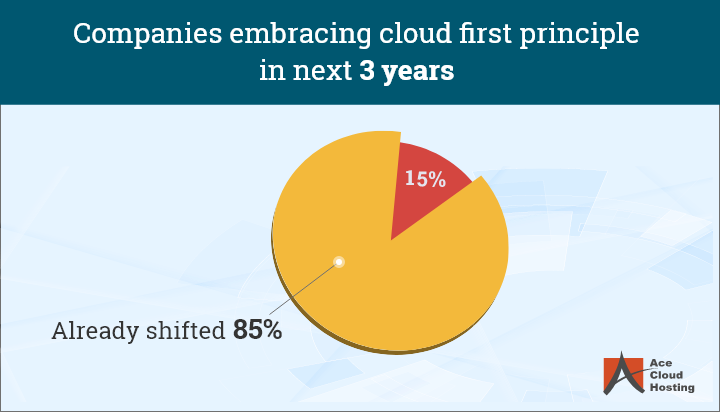
The adoption of cloud technologies is accelerating daily. From working remotely to connecting with clients, it has become the preferred route for monitoring security and budgets.
After the COVID-19 pandemic, a flexible and resilient work-from-home model has become indispensable to businesses around the globe. With companies continually looking for the perfect remote working solution to ensure business continuity, VDI as a service appears to be the need of the hour.
Let’s explore what exactly VDI as a Service really means, how it works, and why it’s quickly becoming the go-to solution for the modern world…
VDI as a Service (VDIaaS) Overview
VDI (Virtual Desktop Infrastructure) as a service is a technology that enables the creation of virtual desktops over a centralized server setup managed by a third-party service provider. Users can log into their work desktop from a hotel room, a client site, or even their couch without carrying a device from the office.
It gives businesses a smarter way to deliver secure, high-performance desktops over the internet without managing servers and IT workloads. Whether you’re running a small startup or a large enterprise, VDIaaS helps teams work from anywhere without compromising control or security.
Deliver high-performance, secure remote work experiences with Ace Cloud Hosting’s Citrix-powered VDI.
Traditional VDI vs. VDI as a Service
With traditional VDI, companies need to buy, build, and maintain the entire backend infrastructure, including servers, storage, licenses, and a dedicated IT team to manage it all. It’s resource-intensive, expensive, and time-consuming.
VDI as a Service (VDIaaS) takes that burden off your plate. The service provider hosts and manages the entire virtual desktop infrastructure in the cloud. That means no upfront hardware costs, no maintenance hassles, and enabling instant scalability as your team grows. Your IT team can focus on strategy instead of maintaining servers.
Key Components of VDI as a Service
A fully managed VDIaaS solution combines multiple layers of technology and components to deliver secure, high-performance desktops to end-users.
- Cloud-Based Servers: Businesses can host virtual desktops and business-critical applications in the cloud for a fast, responsive experience.
- Remote Flexibility: Delivers desktops securely over the internet, ensuring reliable access from any device, anywhere.
- Cloud Storage: Stores desktop images, user data, and applications with built-in disaster recovery and automatic backups for high availability.
- Management Console: Gives admins full control to onboard users, allocate resources, monitor usage, and resolve issues all from a customized dashboard.
Benefits Of VDI As a Service for an Enterprise
1. Anytime Anywhere Productivity, No Loss of Access Issues
A major business challenge in the current scenario is 24X7 availability. However, this is not possible when you are working on the traditional systems as you get confined to office desks.
By opting for managed VDI services, your team can access virtual desktops from any location any time. The virtual desktops are delivered from the provider’s cloud servers to the user’s endpoint devices, be it smartphones, laptops, or tablets. Hence, employees can work even while travelling, thereby resulting in increased productivity and reduced stress.
2. Cost Reduction, Reduced CapEx
The on-premise virtual desktop infrastructure involves multiple cost parameters that add to the enterprise’s annual budget. First, you need to purchase high-end office desktops for your employees and the supporting equipment, such as cabling, power, air conditioning, and more. Secondly, it demands additional time and cost for upgradation. Also, firms need a dedicated IT team for infrastructure maintenance and troubleshooting.
VDI as a Service eliminates major capital expenses associated with a traditional desktop setup. Moreover, the cost of purchasing hardware and updates is eliminated as the service provider delivers virtual desktops to end-users. The provider offers dedicated customer support with an onsite IT team to address all your issues.
Know more: 6 Financial Benefits by Moving your Virtual Desktops to the Cloud
3. Fully Managed Services, No Hassles
The physical desktop setup comes with a set of issues. First, a desktop comprises various components, such as RAM, hard drive, or motherboard, that must be replaced due to malfunction. Second, the desktops need to be upgraded periodically to meet the changing business requirements. Moreover, whenever a new employee joins the office, the new desktop needs to be configured. In all this, time and money are lost.
The VDI as Service provider offers a fully managed hosted VDI solution. As the provider has ownership of the VDI environment, their experts take care of all the critical and menial IT tasks. They take care of design, deployment, upgrades, application updates, configuration, and troubleshooting. They also take complete responsibility for data migration and offer 24×7 consultation.
4. Strengthened Security, Eliminated End-point Storage

Data security on local servers and desktops is a major concern for organizations. These devices are vulnerable to threats such as power surges, employee negligence, and viruses that can cause data loss. Moreover, cyber threats can also lead to data breaches and theft.
VDI, as a service, offers complete data protection to employees. Virtual desktops are accessed on endpoint devices, and data is stored on remote cloud servers. Hence, data remains secure at the backend if a device gets damaged or stolen.
Additionally, the service provider offers multi-level security implants, such as multi-factor authentication, end-to-end data encryption, traffic analysis, OS patching, antivirus management, group policy controls, ransomware protection, and more. This ensures data and app security on all fronts.
5. Disaster Recovery, No Data Loss
Certain disruptive events, such as earthquakes, floods, or cyberattacks, can damage or compromise the entire IT infra. When your data and apps reside on the local IT infrastructure, it can lead to total data loss as backup servers are also hampered.
A good VDI Service provider offers disaster recovery as a part of their services. Disaster recovery is a process with proactive strategies, procedures, and infrastructure aimed at recovering and restoring data during a disruptive event. As a part of disaster recovery, the provider replicates your data and apps on data centers located in diverse locations. Thus, if a disaster strikes one of the data centers, your access is shifted to another. This means that you can keep working without interruption.
6. Full-time Support, Maintained Business Continuity
IT support is a vital part of every desktop setup. The on-premise IT infrastructure must be able to address the workload of the workforce. Therefore, it should be directly proportional to the workforce size. As the workforce increases, you need to expand your IT resources, leading to recurrent costs and efforts.
The hosted VDI provider offers round-the-clock support to all customers to troubleshoot any desktop-related issues. You can connect with the team via call, chat, or email when a problem occurs. A reliable provider assigns you a dedicated executive and guarantees an instant response.
7. Unlimited Storage, Daily Backups
As a company grows, so does its data. Consequently, businesses need to periodically add new backup servers. This requires additional budget allocation, office space, and an extension of the IT team.
With VDI as a Service, the provider offers you unlimited data storage in their cloud environment. The data is backed up automatically on a daily or hourly basis. As VDI as a Service is a cloud solution, users can access backed up data using any personal device.
Now enjoy customized storage options with tailor-made VDI pricing plans.
Deployment Process & Best Practices
VDI as a Service isn’t just about switching to the cloud; it requires a thoughtful, step-by-step approach. Following these best practices can make your deployment smoother and more cost-effective:
- Assess Your Needs: Start by evaluating your computing, storage, and network capacity. Make sure your current setup can handle the performance demands of a virtual desktop environment.
- Design Smart Desktop Images: Tailor virtual desktop images based on user roles, application needs, and storage preferences. This ensures a streamlined experience for every team member.
- Secure Your Network: Set up key networking and security configurations, including VPNs, firewalls, and encryption, to protect data and enable secure remote access.
- Run a Pilot Test: Before choosing the best VDI provider, launch a pilot program. Gather user feedback, run performance checks, and adjust the setup as needed.
- Migrate in Phases: Avoid disruption by moving users in batches. Offer clear training and ongoing support to help teams adjust quickly.
- Monitor & Optimize: Keep an eye on performance, availability, and user activity. Use analytics and monitoring tools to tweak and improve the environment over time.
Security & Compliance in VDIaaS
When you migrate your physical desktops to the cloud, security and compliance can’t be compromised. Here’s how to keep your virtual desktop environment secure and audit-ready:
- Use Secure Access Protocols: Implement encrypted remote access methods like SSL VPN or IPsec to keep data safe in transit.
- Enforce Strong Access Controls: Set up role-based access, multi-factor authentication, and other access restrictions to prevent unauthorized access.
- Continuously Monitor Threats: Watch for malware, suspicious activity, and access anomalies. A trusted provider like Ace Cloud Hosting offers built-in threat detection and response tools.
- Audit Regularly: Perform scheduled security and compliance audits to meet industry regulations like HIPAA, SOC 2, or GDPR, depending on your sector.

Why do you require a VDI Service Provider?
- Hiring a VDI service provider will decrease the cost of establishing software and hardware on-premises and give you a heads-up to run your business operations efficiently. Therefore, you don’t have to subsidize high-end servers or equipment, as all the data is accessible from the secure cloud server.
- It reduces your IT team’s workload, as the service provider manages multiple servers and desktops, so businesses can focus on core business needs.
- The ability to easily scale up or down resources with intelligent load balancing and monitoring is hugely beneficial.
- A proficient service provider provides reliable security and round-the-clock monitoring, so your data is in safe hands.
- The biggest advantage of VDI as a service over the traditional VDI model is device independence. Today, all businesses demand instant access and faster delivery of solutions. With VDI as a Service, users have the freedom to work from the cloud with no limits on office devices. There’s no need to install special software or hardware to keep the business running smoothly.
Switch to Ace Cloud Hosting’s ready-to-go virtual desktop environments.
How Does Ace Cloud Hosting’s VDI As a Service Help Businesses Grow?
Moving virtual desktops and apps to the cloud brings innovation to enterprise workloads experiencing digital shifts for the first time. Managed VDI acts as a power-packed technology that helps businesses overcome IT challenges. With the tech stack growing, IT managers frequently get overwhelmed with managing every infrastructure component.
VDI as a Service is a managed virtual desktop solution that offers businesses mobility, security, and scalability to thrive in remote working scenarios. On the other hand, it reduces capital expenses, minimizes IT hassles, and improves employees’ productivity, even from the comfort of their homes. However, if you are unsure whether to opt for VDI as a Service, there are many VDI service providers offering a demo or a free trial.
Ace Cloud Hosting delivers secure, reliable, and fully managed VDI solutions with free migration and ongoing support. Our subscription-based pricing model and scalable infrastructure are designed to meet your specific business needs. Book a free consultation or start your 7-day free trial today!


