
Table of contents Toc Icon
Table of contents Toc Icon
QuickBooks Desktop is a popular accounting software used by accountants and CPAs to manage their financial operations. Nevertheless, businesses nowadays demand remote access, cost-effectiveness, smooth user collaboration, and improved control over their financial processes. The cloud-based QuickBooks version fulfills all these requirements efficiently.
Cloud-based QuickBooks refers to deploying the QuickBooks Desktop software on cloud servers instead of being installed and run on individual local computers.
Research from Sage shows that 67% of accountants believe cloud integration is vital for success. With cloud adoption now the industry standard, mastering tools like QuickBooks Cloud Desktop is essential. Understanding its mechanics is key to leveraging the full benefits of remote financial management.
In this guide, we’ll explore how QuickBooks works on the cloud, explore its key benefits, and learn simple steps to access it.
Experience seamless accounting with a 7-day free trial to see how Cloud-based QB Solutions work for your business.
What Does Hosting QuickBooks in the Cloud Mean and How Does It Work?
This means storing your QuickBooks software and data on remote servers accessed via the internet. It offers flexibility, security, and scalability, allowing users to access QuickBooks anytime. Hence, you can streamline operations, enhance collaboration, and reduce IT costs.
QuickBooks maintains the same interface, features, and functionalities as the desktop version. The platform saves all changes automatically, allowing authorized users to access and collaborate on real-time data effortlessly. The QuickBooks cloud version reduces the limitations of traditional desktop-based accounting practices.
Businesses can access their QuickBooks software securely from the cloud through cloud hosting. Here’s how it works:
- Providers install licensed copies of QuickBooks on their servers.
- Users connect to the server via the Internet using Remote Desktop Protocol (RDP) or a web browser.
- The system applies security protocols to protect data and secure the connection while working on the QuickBooks server.
Users get seamless access to any device, desktop, tablet, or smartphone across different operating systems.
Benefits of Working on QuickBooks in the Cloud
Hosting providers operate advanced data centers with powerful servers optimized for an enhanced user experience. Equipped with robust hardware and backup systems, these servers ensure data integrity and availability.
Working with QuickBooks in the cloud offers several advantages:
- Accessibility: Access QuickBooks from anywhere, anytime, especially ideal for remote or hybrid teams.
- Scalability: Easily scale usage up or down without investing in new hardware or software.
- Security: Update security measures regularly, ensuring compliance and peace of mind.
- Automatic Backups: Data is backed up automatically, safeguarding your critical financial information.
- Cost Savings: More cost-effective than maintaining in-house servers, eliminating the need for expensive hardware and ongoing maintenance.
- Collaboration: Multiple users can access QuickBooks on the cloud simultaneously, facilitating real-time collaboration on financial tasks.
Is QuickBooks on Cloud the same as QuickBooks Online?
No, QuickBooks Hosted on Cloud involves hosting QuickBooks Desktop on remote servers, providing advanced features, industry-specific tools, and robust reporting options. Users can seamlessly integrate with other software and access QuickBooks from anywhere with an internet connection.
On the other hand, QuickBooks Online, developed by Intuit, is a cloud-native solution designed for simpler accounting needs. While it offers convenience with no installation required, it may lack some advanced features found in QuickBooks Desktop. Therefore, businesses with complex accounting needs may prefer QuickBooks Desktop hosted in the cloud for its comprehensive features and capabilities.
Also Read: QuickBooks Online vs. Desktop: Which One is Right for You?
Parameters To Consider When Transitioning To Using QuickBooks on the Cloud
Transitioning to QuickBooks cloud accounting provides a seamless experience, but there are some things to consider first. Here’s what you need to know before you start:
- Choose a Reliable Hosting Provider: Find a reliable company specializing in hosting QuickBooks.
- Decide on QuickBooks Version: Determine which version of QuickBooks (Pro, Premier, Enterprise, or POS) you want to use in the cloud.
- Get Licenses: Make sure you have valid licenses for the QuickBooks software you’ll be using. If you don’t have one, you can get it from a trusted source like Ace Cloud Hosting.
- Understand Costs: Take the time to understand the QuickBooks cloud pricing structure for hosting plans, including fees based on users and server resources.
- Prepare Your Data: Keep your user login details handy for accessing your QuickBooks account once it’s hosted.
- Migrate Your Data: Work with your hosting provider to seamlessly migrate your existing QuickBooks data to the cloud, ensuring it reflects your local setup.
- Check Your Internet Connection: Ensure you have a stable internet connection to access QuickBooks online.
Taking care of these things upfront will help ensure a smooth transition to using QuickBooks in the cloud, giving you more flexibility and security for your accounting needs.
Steps to Access QuickBooks on the Cloud
Once your server is set up completely with QuickBooks installed, you can easily access the hosted application via Remote Desktop Connection on your device.
Here’s how you can access QuickBooks hosted on the cloud:
Step 1: Your provider will give you the Remote Desktop Protocol (RDP) application to access the QuickBooks cloud environment. RDP application is commonly used to access applications and resources on a remote server, including QuickBooks hosted on the cloud.
Step 2: Once installed, open the ‘Remote Desktop Connection’ Application on your computer.
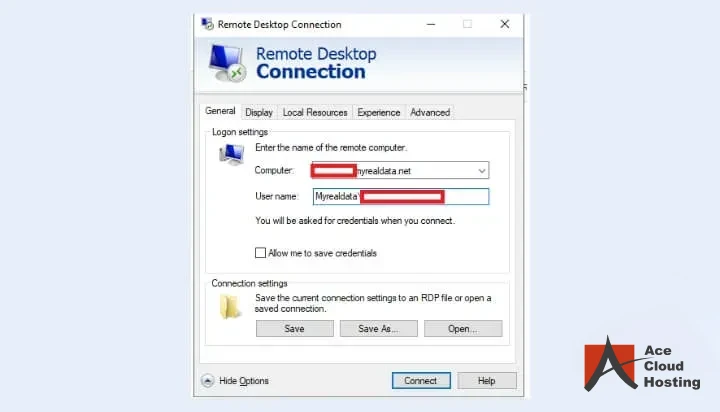
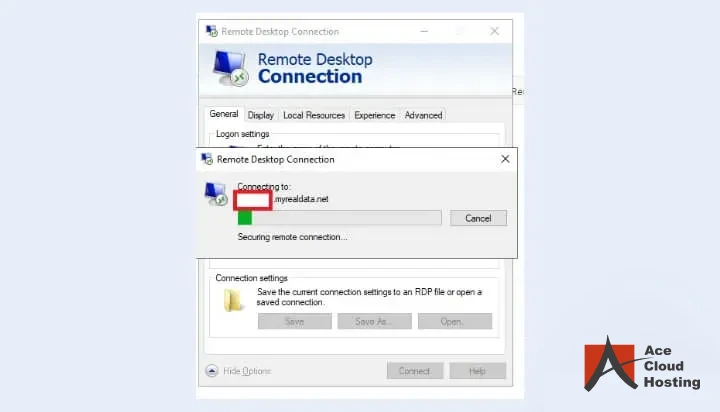
Step 3: A dialog box opens with your username pre-filled; add your credentials and click “OK” to get directed to the cloud server.
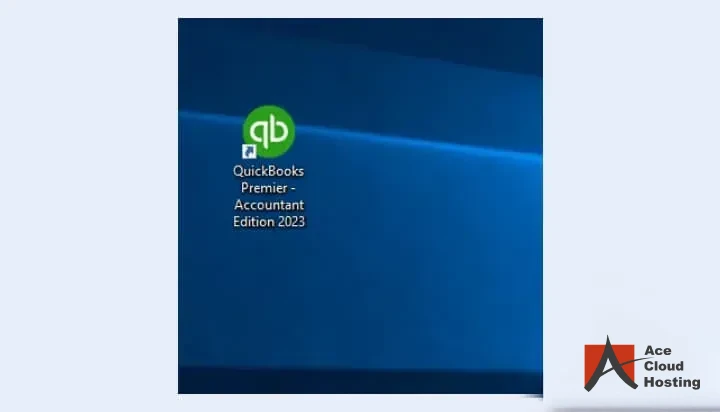
Step 4: As the cloud workspace opens, double-click on the “QuickBooks” icon on the desktop screen.
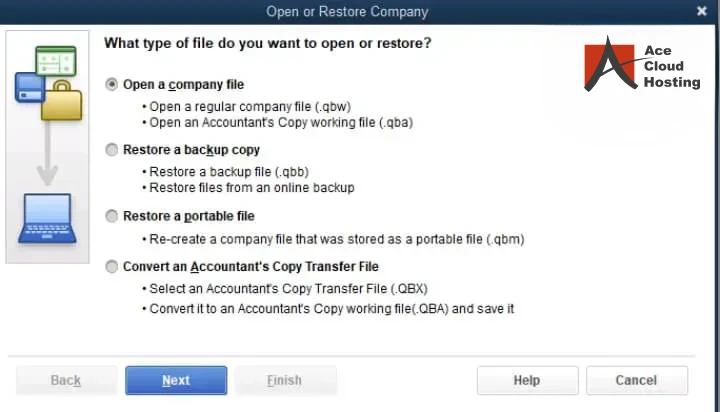
Step 5: Click on ‘Open or restore an existing company file‘.
Step 6: Your company file is now open and ready. Start updating transactions and collaborating with your team in real time. If anything feels stuck, reach out to your hosting support for a quick fix.
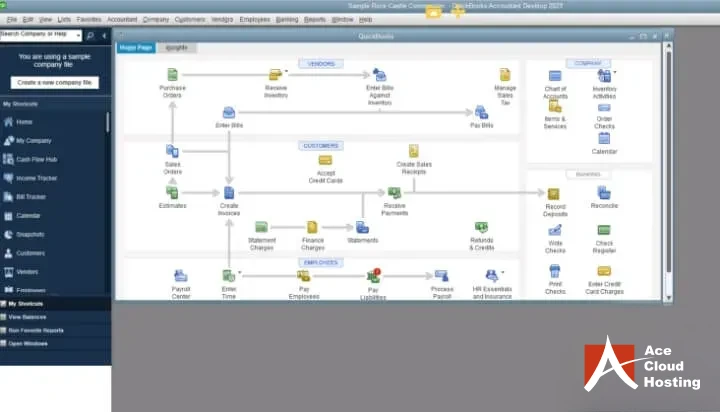
This is how you can work on the accounting files available for your business with cloud-hosted QuickBooks.
How to Choose a Trusted QuickBooks Hosting Provider
For a seamless QuickBooks cloud accounting experience, consider these factors:
- Intuit Authorized: Opt for reliable providers authorized by Intuit to ensure compatibility and reliability.
- Reliability and Uptime: Prioritize providers with 99% uptime and minimal downtime to safeguard your business data.
- Security Measures: Select providers employing industry-standard encryption, physical server security, and regular data backups for enhanced protection.
- Responsive Support: Look for providers offering knowledgeable technical support to promptly address any issues that arise.
- Compatibility: Choose providers supporting multiple QuickBooks versions and editions to adapt to changing software requirements.
- Integration Capabilities: Check if the provider can integrate QuickBooks on the cloud with other essential business applications for a seamless workflow.
- Scalability: Ensure the provider can accommodate your business’s growth by offering scalable solutions tailored to your evolving needs.
- Transparent Pricing: Look for providers with competitive QuickBooks Hosting pricing models and clear information on additional fees to align with your budget and expectations.
Who Should Consider QuickBooks Cloud Hosting?
Small and Medium-Sized Businesses
It is ideal for small and medium-sized businesses (SMBs) that want to streamline their accounting processes without investing heavily in IT infrastructure. By moving QuickBooks to the cloud, SMBs can access enterprise-grade tools and security while benefiting from the flexibility to scale resources as the business grows.
It’s an efficient way to manage cash flow, payroll, inventory, and other financial tasks while minimizing operational overhead.
CPAs and Accounting Professionals
CPAs and accounting professionals often handle data from multiple clients, requiring secure and seamless access to QuickBooks company files. Cloud hosting allows them to work collaboratively with their clients in real time, regardless of location.
It also eliminates the need for constant file transfers or version conflicts, ensuring accuracy and productivity. Additionally, the provider manages backups and updates, letting accountants focus on their core work without worrying about IT challenges.
Businesses with Remote Teams or Multi-Location Operations
Companies with remote teams or offices in different locations can greatly benefit from QuickBooks cloud hosting. It enables employees to access the same accounting data from anywhere, fostering collaboration and improving workflow efficiency.
Moreover, it supports real-time updates, so all users can work simultaneously on the same data without delays or duplication errors. This setup is especially valuable for businesses with distributed teams that rely on consistent, secure, and accessible financial systems.
Ace Cloud Hosting: Your Trusted QuickBooks Hosting Provider
Ready to move your QuickBooks Desktop to the cloud? We bring 15+ years of experience helping businesses worldwide transition seamlessly and securely with our fully managed solutions.
✔ Award-Winning: Recognized as the “Best Outsourced Technology Provider” by CPA Practice Advisors Readers’ Choice Awards.
✔ Trusted: Trusted by accountants, CPAs, and businesses globally for their cloud solutions.
✔ Secure: Partnered with top-tier data centers boasting SSAE-16 Type-II (SOC-2) certification and PCI DSS compliance.
✔ Reliable: Enjoy an impressive 99.99% uptime, ensuring uninterrupted access to your data.
✔ Customized Plans: Tailored pricing plans to suit your strategic objectives.
Try our 7-day free trial and see how secure, scalable cloud solutions can streamline your operations and boost productivity. Contact us at +1-(855) 505-1896 today!
Frequently Asked Questions (FAQs)
Does remote access to QuickBooks let multiple users work at the same time?
Yes. With QuickBooks Host Multi-User Access, multiple authorized users can log in and work in the same QuickBooks company file at the same time, as long as your QuickBooks license supports the user count and multi-user mode is enabled.
Is QuickBooks RDP better than self-hosted QuickBooks on a local server?
QuickBooks RDP removes location limits, supports remote teams, simplifies IT management, and improves disaster recovery compared to local server setups. Hence, you can efficiently work and share the QuickBooks company file with your accounting team.
What’s the difference between QuickBooks Online and QuickBooks Cloud?
QuickBooks Online is a browser-based product. QuickBooks cloud hosting runs the desktop version of QuickBooks on a server, giving you remote access while keeping all desktop features, add-ons, and multi-user capabilities.
How much does QuickBooks cloud hosting cost?
Pricing depends on server type, number of users, storage, performance requirements, and support level. Most providers offer flexible plans based on your workload and business size. Contact our Solutions Consultant to get pricing plans tailored to your business.
Is my data safe on the cloud?
Yes, when you choose a reputable provider, your data is secure. They employ robust security measures such as encryption, firewall protection, and regular data backups to keep your financial information safe from unauthorized access and data loss.
Can I use QuickBooks hosting with my existing QuickBooks Desktop license?
Yes, in most cases, you can use your existing QuickBooks Desktop license with QuickBooks on Cloud. Most providers typically offer options to host your licensed version, allowing you to retain your familiar software while gaining the advantages of cloud access.
How does multi-user collaboration work with cloud-hosted QuickBooks?
QuickBooks on Cloud enables seamless multi-user collaboration. Team members can access the same QuickBooks file simultaneously, making it easy to work together in real-time. Changes made by one user are instantly reflected for others, fostering efficient teamwork.
Can I host multiple QuickBooks Enterprise versions in the cloud?
Yes, you can host multiple versions of QuickBooks Enterprise, including Silver, Gold, Platinum, and Diamond subscriptions, and all versions up to 2024, all at once. We also host QuickBooks Enterprise Accountant software.













Comments (7)
QuickBooks is so critical with the information that it cannot be shared with the usual employees and people comfortable keeping it on a third-party server.
When implemented the right technology, this is one of the biggest advantages of using the third-party server. With the proper encryption, one can ensure that only authorized users are able to access QuickBooks data and even the hosting provider cannot view it. Moreover, you can allow and revoke the access to the different users pretty easily.
Most businesses are just obsessed with Qb. Otherwise there are a number of better and reliable cloud based software for accounting available to choose from.
For those who are not willing make big move from the usual Quickbooks, hosting is better than QBO.
QBO has its own merits, such as it will always offer the latest features automatically. Hosting Qb on cloud will have the license limitations and all.
Finely written article
Qucikbooks online is yet to develop to deliver a complete accounting solutions, but cloud is now a necessity. Intuit has been trying hard to lure clients for QBO, bur hosting is way more reliable solution.