Table of contents Toc Icon
Table of contents Toc Icon
Data volumes are soaring, making data security a top priority for businesses, whether data resides on endpoints, servers, or in the cloud. As per Cybersecurity Magazine, the total data storage in 2025 is estimated to be around 200 zettabytes. However, the surge in data volumes also corresponds to a surge in cyber attacks.
Data backup adds an extra layer of protection, ensuring access even during ransomware attacks or accidental deletion. Both endpoint and server backups provide critical protection, but they serve different business needs and scales. Choosing the right backup strategy depends on your organization’s size, infrastructure, and risk tolerance.
In this blog, we’ll compare endpoint and server backup processes, highlighting their features, benefits, and ideal use cases to help you make an informed decision.
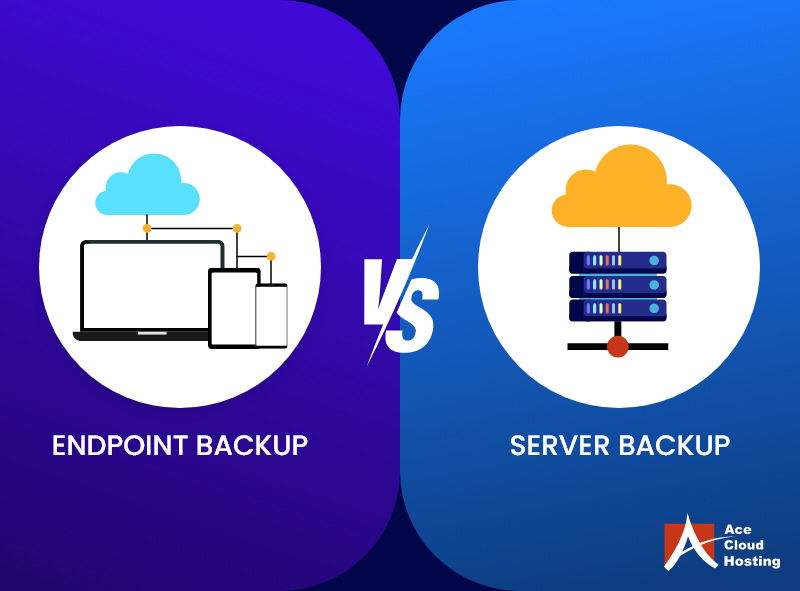
What is an Endpoint Backup?
Endpoints are the devices on which employees access data and work on business applications. Contrary to servers, endpoints can be diverse, ranging from smartphones to laptops, PCs, and tablets.
These are a network’s final entry and exit points, making them most susceptible to attacks. Hence, it is imperative to take a backup of the data stored on these devices, whether on-premise, cloud, or external devices, often called endpoint backup.
Why Endpoint Backup Matters
- 74% of all data breaches involve some form of human element. (Verizon)
- 65% of employees bypass their organization’s security policies to improve productivity. (HIPAA Journal)
- The average number of weekly cyber attacks per organization increased by 21% in 2025. (Check Point)
What is a Server Backup?
Server backup stores the data contained in live servers that host applications, databases, and environments. For instance, copies of a virtual machine or containers can be created as a server backup to ensure easy restoration in the case of a security incident.
Why Server Backup Matters
- The average cost of a data breach is estimated to be $4.4 million. (IBM)
- 39% of IT professionals restore their data at least once a month. (Blackblaze Survey)
Endpoint Backup and Server Backup: A Comparison
| Parameters | Endpoint Backup | Server Backup |
| Main Function | Securing endpoint data | Securing centraldatabases and applications |
| Devices in focus | Laptops, PCs, local systems, smartphones. | On-premise servers |
| Recovery scope | File-level recovery or full device restore | Application-level, system-level, or full server restore |
| Direct Impact on | Endpoint data and applications | Servers and network |
| Cost | Increase with the number of devices | Increases with server size |
| Backup Frequency Recommended | Real-time backups | Scheduled backups |
| Real-World Examples | Lost laptop, hardware malfunction | Ransomware attack encrypting the main server |
Prevent ransomware, insider threats, and accidental deletions with automated cloud backups for both endpoints and servers.
Endpoint and Server Backup: Pros and Cons
Pros of Endpoint Backup
- Secures the Distributed Workforce
The global business workforce operates from different geographies and time zones, leaving endpoints vulnerable to cyber attacks. With endpoint backup, CIOs can ensure protection against ransomware and phishing attacks, whether the employees work on a public wifi or a home network.
- Protects your Data in Multiple Ways
The data stored in endpoints can be compromised in several ways. For instance, laptops can be stolen, lost, or broken. Endpoint backup ensures that all data can be restored to another authorized device whenever an endpoint is compromised.
- Focused Recovery
Endpoint backups ensure granular recovery, which means that only the affected endpoint can be isolated from the network, and its data can be recovered. Whether it’s a mistakenly deleted document, a corrupted file, or a previous version needed for reference, granular recovery reduces downtime and improves employee satisfaction.
- Compliance Assurance
Endpoint backup ensures compliance for industries, such as finance, legal, and healthcare, that need to adhere to multiple government regulations. For instance, HIPAA mandates every entity to implement access controls on endpoints to safeguard PHI against unauthorized access. Moreover, endpoint backup implementation enables the generation of accurate audit reports.
- Reduces Insider Threats
According to Mimecast’s Human Risk Report, 95% of all data breaches are caused by human error. Additionally, other insider threats, such as accidental deletion, unauthorized access, weak passwords, or insecure browsing, also increase the chances of ransomware attacks. Automated endpoint backup solutions ensure data recovery in seconds, minimizing the repercussions of insider threats.
Pros of Server Backup
- Ensures Business Continuity
Server backups ensure business continuity during a security event like a ransomware attack. When the corporate network is compromised, server backups can recover crucial client data to prevent ransomware attacks. In addition, downtime due to security incidents is also reduced, which minimizes financial damages.
- Centralizes Data Protection
Server backup offers a centralized platform for critical business information, including customer databases, vendor payments, or project details. It improves manageability and minimizes IT complexities for your in-house team.
- Increased Scalability
As the business grows, you need more storage space for backup. Server backups can be replicated on the cloud for unrestricted scalability. You can avail managed backup services for cloud providers like Ace Cloud Hosting for instant data restoration.
- Reduced Risk of Data Fragmentation
When businesses rely heavily on endpoint storage or scattered cloud tools, data becomes fragmented across locations and platforms. This makes it difficult to locate, secure, or consistently restore data. Server backups consolidate business-critical files into a centralized record system, making monitoring, governance, and recovery more efficient.
Cons of Endpoint Backup
- Complex Management
Endpoint backup can cover hundreds or thousands of endpoints, depending on the size of the operations. Managing and deploying backup solutions across these many endpoints can be challenging.
- High Scalability Costs
As the business expands, new endpoints are added to the corporate ecosystem daily, forcing businesses to invest significantly in endpoint backup infrastructure.
- Lack of Business Continuity
Endpoint backup cannot guarantee business continuity as it stores only data from individual devices. However, other programs and data are hosted on on-premise servers. Therefore, endpoint backup is not sufficient during a security incident that affects the on-premise servers.
Cons of Server Backup
- High CAPEX
Server backups require a dedicated infrastructure to accommodate large data volumes. Moreover, the backup infrastructure requires regular maintenance and upgrades. That is why most businesses nowadays opt for managed backup services as a more scalable and affordable option.
- Prime Targets
Although it is easier to get entry into an organization’s network through endpoint devices, the main target of cyber attackers is mostly the server backup with complete application, process, and financial data. This makes it even more vital to secure backups with advanced protocols.
Best Practices for Endpoint and Server Backup
- Adopt the 3-2-1 strategy – It is recommended to make three copies of both endpoint and server backups. Store two copies on different media, and keep one copy off-site to recover quickly from disasters, ransomware, or accidental deletions.
- Implement automated solutions – Deploy a backup solution from the best managed backup providers like Ace Cloud Hosting that automates backup to reduce IT efforts and human dependencies.
- Deploy advanced security features – Deploy security protocols like data encryption and multi-factor authentication to prevent unauthorized access, phishing, and insider threats.
- Adopt cloud solutions – Cloud backups provide scalability, geographic redundancy, and faster access compared to traditional on-premises systems.
From endpoints to servers, our managed backup solutions deliver enterprise-grade protection, scalability, and peace of mind.
Deploy Endpoint and Server Backup on Cloud with Ace Cloud Hosting
Both endpoint and server backup safeguard critical business data on different levels. When it comes to data protection, the debate isn’t really which backup to choose; it’s about knowing their roles and combining them for maximum resilience. However, deploying advanced backup solutions from scratch can be challenging.
Ace Cloud Hosting offers automated endpoint and server backup solutions on the cloud with on-demand scalability and enterprise-grade security. Book a free consultation now to find the best backup solution tailored to your business needs.