How to access QuickBooks company file

  • 516 Viewed
  • Updated on June 7, 2023
  • 1 Min Read
     
    Toc Icon

    Table of contents Toc Icon

      To access the QuickBooks company file, follow along the steps mentioned below:

      1. Open QuickBooks.
      1. Click OK.

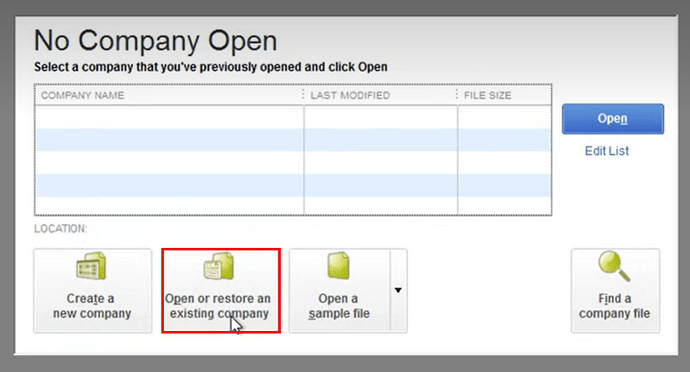
      3.** Click on Open or restore an existing company.
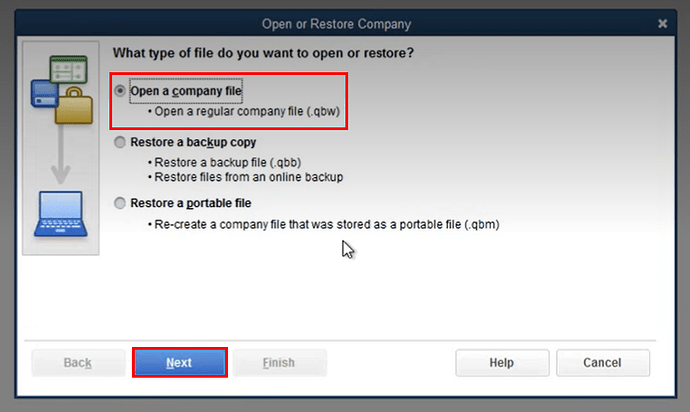
      1. Select Open a company file option and click Next.
      5.** Select your company file.**

      select-your-company-file

      1. Enter your username and password and click OK.

      enter-your-username-and-password

      Still Need Help? We’re Here For You!

      Our experts are ready to assist with setup, troubleshooting, or any product issue. Get in touch now!

      SHARE:

      About Ace Cloud Hosting

      Ace Cloud Hosting's profile picture

      Ace Cloud Hosting is a trusted cloud solutions provider with 15+ years of experience serving accountants, CPAs, SMBs, and enterprise businesses. We specialize in delivering application hosting, virtual desktops, managed IT, and cybersecurity solutions. With US-based data centers, 99.99% uptime, and 24×7 expert support, Ace Cloud Hosting helps businesses access the high-performance and secure solutions they need.

      Find Ace Cloud Hosting on:

      Leave a Reply

      Your email address will not be published. Required fields are marked *

      Copy link