Table of contents Toc Icon
Table of contents Toc Icon
How to Reset Password
How to Reset Your Password – Server 2016
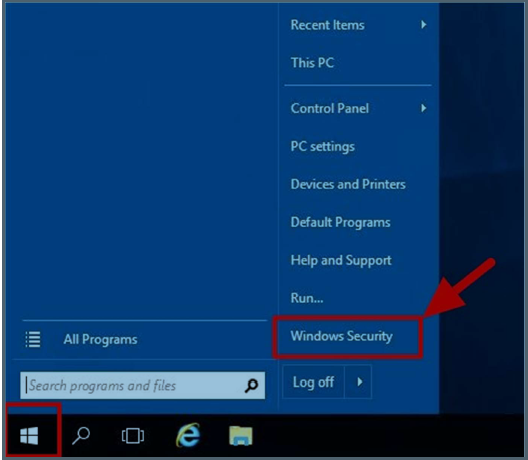
- Please log into the server, click on Start → Windows Security OR Press Ctrl + Alt + End simultaneously. If on Mac, press Fn + Ctrl + Alt + Backspace simultaneously.
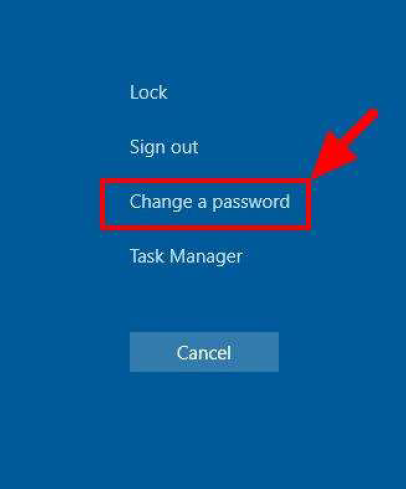
- Click on Change a password
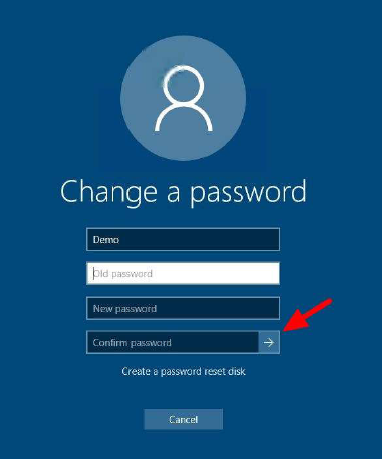
- Enter the old password, new password, re-enter the new password and press Enter.
Note: Owing to the password complexity requirements, kindly ensure the following requirements are met:
1. Should in ATLEAST ONE UPPER case character.
2. Should include ATLEAST ONE NUMERICAL character.
3. Should include ATLEAST ONE SPECIAL character, e.g. @, #, $ etc.
4. Password must contain at least 8 characters.
5. Password cannot part of the username.
Example: Ygv@565fd, BXz##fd1)
Alternatively, Once logged in to your Windows session, press CTRL + ALT + DELETE and then click on Change a password.
Still Need Help? We’re Here For You!
Our experts are ready to assist with setup, troubleshooting, or any product issue. Get in touch now!

Find Ace Cloud Hosting on: