How to Log Off Properly From the Server

  • 602 Viewed
  • Updated on June 7, 2023
  • 1 Min Read
     
    Toc Icon

    Table of contents Toc Icon


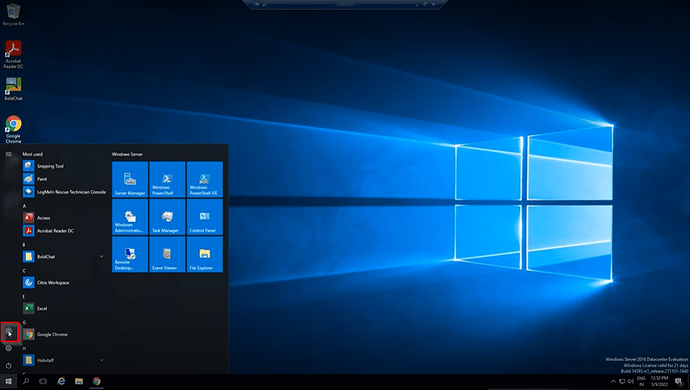
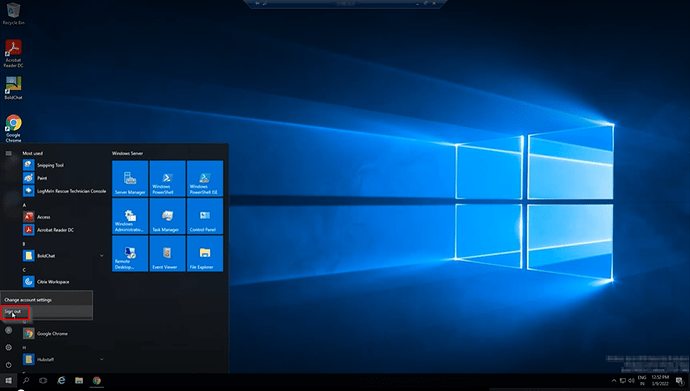
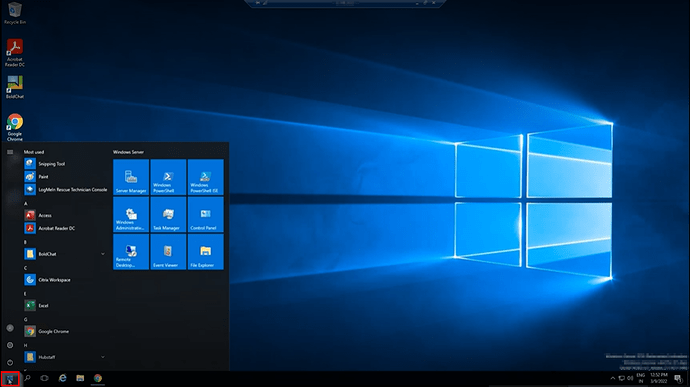
      When you’ve finished working on your server, the best practice is to log off or sign out. All of your apps, however, continue to run in the background when you click the X button to disconnect from the server. It’s the same as turning off your computer but not your monitor. Follow these steps to ensure that you are entirely logged off from the server to avoid issues such as program slowdown and memory drain:1.1

      1. Click the Start button.
      1 (1)

      2. Click on your profile.

      3

      3. Click Sign out.

      2
      Still Need Help? We’re Here For You!

      Our experts are ready to assist with setup, troubleshooting, or any product issue. Get in touch now!

      SHARE:

      About Ace Cloud Hosting

      Ace Cloud Hosting's profile picture

      Ace Cloud Hosting is a trusted cloud solutions provider with 15+ years of experience serving accountants, CPAs, SMBs, and enterprise businesses. We specialize in delivering application hosting, virtual desktops, managed IT, and cybersecurity solutions. With US-based data centers, 99.99% uptime, and 24×7 expert support, Ace Cloud Hosting helps businesses access the high-performance and secure solutions they need.

      Find Ace Cloud Hosting on:

      Leave a Reply

      Your email address will not be published. Required fields are marked *

      Copy link